
 HQ/EMEAFind out how we can help your business


Introduction
Script Editor has been leveraged in malware campaigns before; however, in this case, the attack introduces a more subtle delivery mechanism by invoking it directly from the browser using a custom URL scheme. This approach removes the need for traditional tools like Terminal, which are often flagged or monitored, and instead relies on a trusted macOS application to execute the payload. By triggering Script Editor in this manner, the attacker lowers suspicion and simplifies user interaction, making the execution flow appear more legitimate while still enabling malicious code execution behind the scenes.
Initial Access via Script Editor
Unlike traditional ClickFix attacks that trick users into pasting commands into Terminal, this version starts from a browser and opens Script Editor instead.

Users are taken to an Apple-looking webpage that claims to help them “free up disk space on their Mac.” The page gives simple step-by-step instructions that look like normal system maintenance tips.
When the user clicks an “Execute” button, the attack moves to the next stage. Instead of running Terminal commands, it uses an applescript:// link that:
- Opens Script Editor directly from the browser
- Asks the user for permission to proceed
- Loads a pre-filled script automatically
- This reduces the amount of manual input required from the user and makes the process look more legitimate.
Decoded Payload:
applescript://com.apple.scripteditor?action=new&script=– macOS Storage Optimization
- System Maintenance Module v3.2
- Copyright 2026 Apple Inc. All rights reserved.
- This utility scans and removes:
- Temporary system caches
- Stale application data
- Old diagnostic logs and crash reports
- Unused language resources
It presents a confirmation dialog to the user, falsely indicating that a storage optimization process has completed and that disk space has been recovered.
This AppleScript payload is a malicious, obfuscated loader disguised as a macOS storage optimization utility. While it presents itself as a legitimate system maintenance tool, its core functionality reveals otherwise. The script uses a heavily obfuscated string that is decoded at runtime using a character substitution (tr) technique to reconstruct a hidden URL. It then leverages the curl command with silent and insecure flags (including ignoring SSL certificate validation) to fetch content from this remote server and immediately pipes it into the zsh shell for execution. This technique enables fileless execution, allowing the attacker to run arbitrary code directly in memory without leaving obvious traces on disk. Such behavior is commonly associated with malware loaders or droppers, which are used to deliver secondary payloads like backdoors, credential stealers, or remote access tools. To further deceive the user, the script displays a fake success message claiming that disk space has been freed, reinforcing the illusion of legitimacy. Overall, this payload demonstrates clear signs of social engineering, obfuscation, and remote code execution, making it highly suspicious and indicative of malicious intent.
Execution Flow and Payload Delivery
The behavior of Script Editor can vary depending on the macOS version. On newer versions like macOS Tahoe, the system may show an extra warning asking the user to approve saving the script before execution.
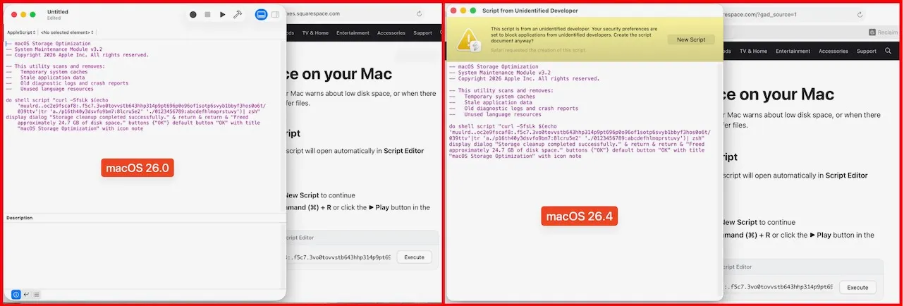
Once the user runs the script, a hidden command is executed in the background. At first glance, the command looks unclear because it is intentionally hidden (obfuscated).
However, it works in a familiar pattern:
- A hidden string is decoded using simple text manipulation tricks
- It becomes a real download link
- A tool like curl downloads content from a remote server
- The content is executed immediately without being saved to disk
If successful, this first stage delivers a second hidden payload.
This second stage is further concealed using encoding methods like base64 and compression (gzip). In some variations, other compression tools like bunzip2 are used instead.
After decoding, the script downloads a Mach-O binary into the /tmp folder. This file is identified as a variant of Atomic Stealer. The script then:
- Removes security attributes from the file
- Grants execution permissions
- Runs the malware on the system
Indicators of compromise
- URL: dryvecar[.]com
Type: domain
Description: Associated with the delivery of an infostealer payload. - URL: https://storage-fixes.squarespace[.]com/?gad_source=1
Type: URL
Description: Linked to a ClickFix-themed social engineering page. - URL: https://cleanupmac.mssg[.]me/?gad_source=1&gad_campaignid=23708793071&gbraid=0AAAABBS8jKrbkIiVdpqodGRoYiYNaByHP&gclid=EAIaIQobChMI2uaJ-_TJkwMVpqJQBh1N6yRoEAAYBCAAEgLXrfD_BwE
Type: URL
Description: Another ClickFix-related lure page used to redirect or facilitate the attack chain.
Conclusion
This attack demonstrates the continued evolution of ClickFix techniques, which maintain the same core objective: persuading users to execute malicious commands. Instead of relying on Terminal-based execution, attackers now leverage Script Editor to bypass newer security controls and reduce user suspicion. Although the delivery method has changed, the goal remains consistent deploying infostealer malware.
