
 HQ/EMEAFind out how we can help your business

1. Executive Summary
K7 RAT is a builder that sells an Android remote access trojan which fully compromises a device via one accessibility service permission. All the rest follows from that permission being set. This build (K7_RAT_v1.0.0.apk, SHA256 73622a6d3730cf390fdfd8c2c7a843fec7c94bfae59b16983919e23f02d78e6a) is an example output instead of a manually assembled payload. The package name remains com.example. All configuration constants have the SABLON prefix, meaning template in Turkish language. It is a commercial product and analyzed sample is the output that the product generates prior to customization by an operator.
It implements considerably more capabilities than uses now. There are three distinct vulnerabilities disabling an entire layer of this product’s functionality either in some specific devices or in any case at all.
- The socket client retrieves the host address through the literal empty string passed to the decryption function instead of the one where the builder writes the operator configuration. In result, each build that this template outputs comes with a socket that never connects despite operator configuration.
- The screen streaming manager is constructed with the application context through the singleton getter; thus, it makes foreground service start impossible and media projection blocked on Android 11 and above.
- The browser cloning subsystem needs root to retrieve any target application data directory content and reports success with empty result on any non-rooted device, while the archive created on rooted one goes through the same broken socket.
Browser control using hidden VNC, live screen streaming, and the useful half of browser profile cloning are included in this build. Other capabilities of this build worth mentioning are keystroke logging, interception of live SMS and notifications, stealing contacts and call logs, remote call placement, remote device locking, and a remote command surface.
Command-and-control channel used in this sample is a Firebase Realtime Database connected via plain HTTPS without any authentication required on any request path, using three independent HTTP client stacks implemented in the code. Anyone with a database URL can retrieve victim data and send commands to the botnet. It is a default feature of the builder and not a misconfiguration made by the operator. Every deployment created by this builder inherits the same level of exposure unless explicitly configured otherwise.
By default, this application is presented as parental control software. All the onboarding texts, lock screen prompt, and the list of permissions presented to the user describe each escalation in terms of child protection. The second disguise, a device optimization utility, is available in this build as well and can be selected just by one configuration value but is not linked to any onboarding flow in the current sample. The only thing common for both disguises is an accessibility service which, once enabled in the onboarding process, will automatically approve permission requests from now on by matching 11 view IDs and 27 button labels in English and Turkish languages within 400 milliseconds after dialog appears. User’s only action results in full control by the attacker.
Three detection signals with highest level of confidence which can be acted upon are the following: an accessibility service which automatically approves its own permission requests, a foreground service notification with title “Sistem Koruması” and deliberately neutral channel name, and unauthenticated PUT or PATCH requests to firebaseio.com URLs matching the following regular expression /devices/{id}/live_keystroke.json. Full detection guidance, command inventory, and indicators of compromise recovered from the sample are provided in separate sections.
2. Threat Actor Profiling
K7 RAT was publicly released on 23 August 2026 to Türk Hack Team, Turkish-language hacking forum, by a forum member slowbaskan123, self-represented as R&D assistant of the Anka Team group. This account was registered on 26 May 2024, almost two years before this release, and had already gained over 5,700 posts and over 5,500 reaction points by the time of this release. According to these statistics and the posting activity, we can conclude that the user slowbaskan123 is an active member of the Türk Hack Team forum who frequently posts various malware and hacking tools to it. One of his previous creations is called AsyncRAT, MajesteBinder, Chimera Loader and other similar softwares. The user has quite a reputation on the forum and is often referred as a “teacher” to other forum members.
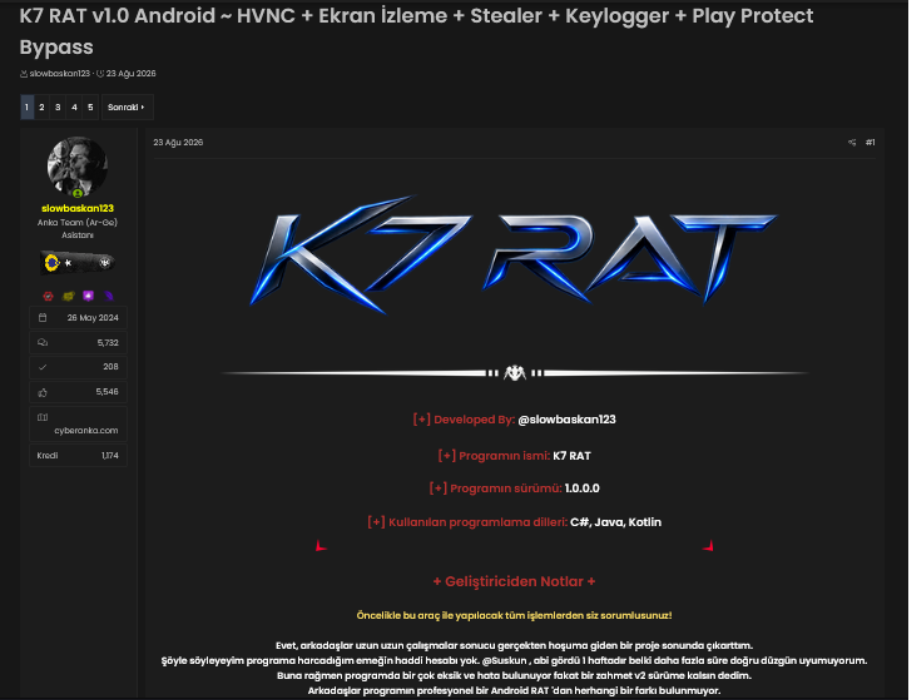
K7 RAT v1.0 original forum posting, Türk Hack Team, 23 August 2026
The above mentioned post constitutes direct commercial marketing material, where the tool is marketed as K7 RAT, with the version 1.0.0.0 and the development languages are stated as C#, Java and Kotlin. This information is correct, according to the technical analysis carried out. The payload is developed in Java and Kotlin, while the desktop builder, which produces the payload, is developed as a C# application, requiring to have Java Runtime and .NET 8.0 installed prior to usage, which exactly matches the required runtimes. Furthermore, the post suggests K7 RAT as a free alternative to CraxsRAT, which is a known commercial Android RAT available mostly in cracked versions and suggests the users use K7 instead of cracked Craxs. The developer clearly disclaims any responsibility for the possible use of the tool and even states explicitly that the product is quite new and surely has a lot of bugs to be fixed in a future release.
The set of advertised capabilities almost perfectly matches the list of capabilities verified by the technical analysis of the binary. There are only two differences that totally refute the claims made in this advertising post. First, there is no Play Protect bypass implemented. Furthermore, the post states that the payload is packed with polymorphic stub. None of the statements is true. There is no packer implemented, there is no any code obfuscation other than the natural one, produced by the compiler and decompilers. Furthermore, there is not even any custom native code, only standard AndroidX libraries. The manifest leaves the application debuggable. There is nothing in the build, which implements polymorphism. There is also nothing in the code, which shows that the detection logic of Play Protect was defeated. On the contrary, the author of the post clearly states that he cannot guarantee the effectiveness of the claimed bypass.
Every other claimed capability is exactly represented in the code and described in detail in the following component analysis. Screen viewing and control, camera access, live microphone monitoring, file explorer, device metadata collection, application enumeration, notifications access, SMS and call logs access, browser history access, contacts access, live location, clipboard monitoring, remote JavaScript execution, which is called as web support, icon hiding, background persistence, C2 communication, anti removal measures, remote locking, alarm harassment and remote call placement capabilities are all present in the source code. The only difference between the advertisement and the build is that some of these capabilities such as screen viewing capability are not implemented and hence do not work at all for the reasons described in the architecture analysis. The marketing materials have no reasons to reveal this fact and hence do not.
3. Architecture Overview
K7 RAT includes eight packages under the com.example namespace. Five configuration classes contain the template constants, XOR decryption routine and permission page implementation. Fifteen hook classes give an operator the possibility to extend the functionality of the application through the extensible entry points, while fourteen out of them are just empty stubs. Eighteen manager classes implement the real logic behind the capabilities. Three service classes implement the background processes of the application. Five receiver classes process the broadcast events, including the boot persistence mechanism. Two worker classes implement the periodic tasks run via WorkManager service. The network package contains Firebase client and the socket client. The naming convention is consistent across all packages. Manager classes are named as XxYoneticisi, hooks are named XxKancasi, receivers as XxAlicisi and services as XxServisi, except K7KomutYurutucu and K7TarayiciKlonlayici, which are implemented in the manager package under English names.
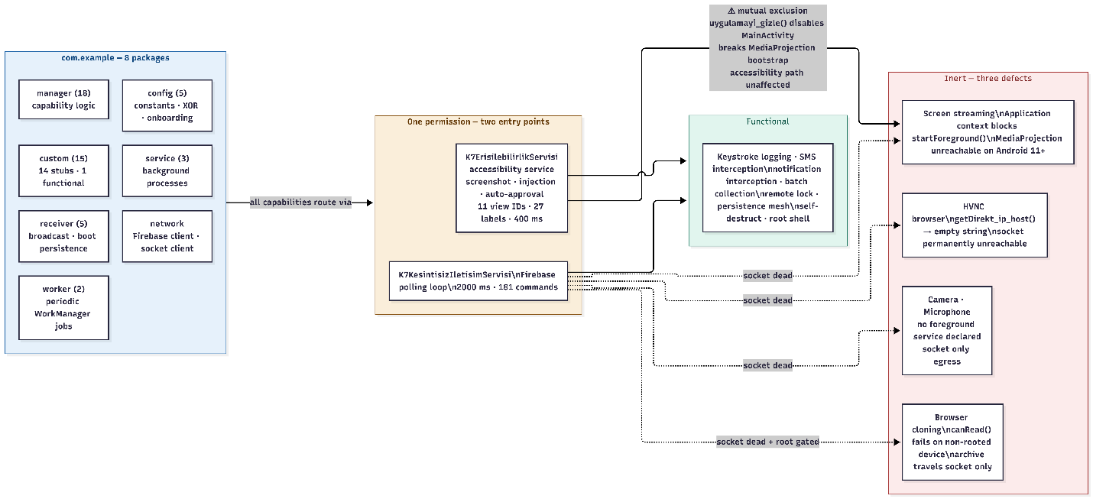
K7 RAT architecture overview – package structure, entry points and inert capability defects
All the capabilities route their processing via one of the two entry points. First, it is K7ErisilebilirlikServisi, which is an accessibility service. Another entry point is the Firebase polling loop implemented in K7KesintisizIletisimServisi. There is no any exploit chain involved. The whole system relies on just one Android permission that is being granted during onboarding and then the accessibility service approves all further permission requests on behalf of the user, by comparing 11 system dialogs view IDs and 27 button labels in English and Turkish, by pressing them in 400 milliseconds after the dialog appears.
There are three flaws which are responsible for the difference between what the code supports and what it executes now. Host getter of the socket client, getDirekt_ip_host() provides the decryption routine with a literal empty string, not the constant into which builder writes operator configuration in contrast to its analogue, getDirekt_ip_port() which successfully decrypts SABLON_DIREKT_IP_PORT. Every build created using this template comes with a permanently unreachable socket no matter what the operator configuration is. CanliEkranAkisYoneticisi is always initialized by means of its singleton getter with an application context, therefore the call of startForeground() is permanently unreachable and it is impossible to initialize MediaProjectionManager.getMediaProjection() on Android 11 and above. The browser cloning subsystem needs root privileges to read private data directories of the target application, and it returns status:”SUCCESS” with empty arrays of result values on any non-rooted device, while the archive created by this subsystem on the rooted device uses only the dead socket.
There is one system level limitation caused by interaction of two modules. Stealth mode and MediaProjection screen streaming are mutually exclusive. Function uygulamayi_gizle() disables MainActivity. Function CanliEkranAkisYoneticisi.ekranAkisiniBaslat() comes to the MediaProjection consent dialog only through MainActivity.INSTANCE.getInstance(). Without MainActivity the bootstrap path is unreachable. The accessibility screenshot path remains unaffected since it goes through the service.
Every capability of the component analysis is evaluated in terms of implementation status and functional status. These two parameters often differ and confusing them is the easiest way to misrepresent the risk of this malware sample in both directions.
4. Component Analysis
Accessibility Service
K7ErisilebilirlikServisi is the only module the rest depend on. This single module executes four different functions within an Android accessibility service, and loss of it is the most high-leverage action for a defender.
It takes the screenshot upon operator command with AccessibilityService.takeScreenshot() on Android 11 and above, or by means of screencap -p via shell otherwise. Neither of these paths require consent dialogs or any kind of visual indication.
It captures key presses via the interception of onAccessibilityEvent() for event type 16 and extracts the character and full input field via fromIndex and addedCount for changed range. Each entry is associated with source package and timestamp and pushed via broadcastKeystroke() once every 10 milliseconds. Data is sent via Firebase under devices/{deviceId}/live_keystroke and through the socket as a LIVE_KEY. The socket path is broken, but the Firebase path works.

broadcastKeystroke() – 10ms throttle and dual Firebase and socket dispatch
It approves permission dialog pops by calling otomatikIzinleriOnayla() upon each event before further processing. This method is scoped only to events that come from packages of permissioncontroller, packageinstaller, settings, systemui and the basic android package and then checks against 11 view ids and 27 buttons names in English and Turkish. There is a 400 millisecond minimum interval between calls. The whole list is in the IOC section. “Bu cihaz yönetici uygulamasını etkinleştir” and “Activate this device admin app” names are hardcoded, which means Device Admin activation approval is an intent of this code.
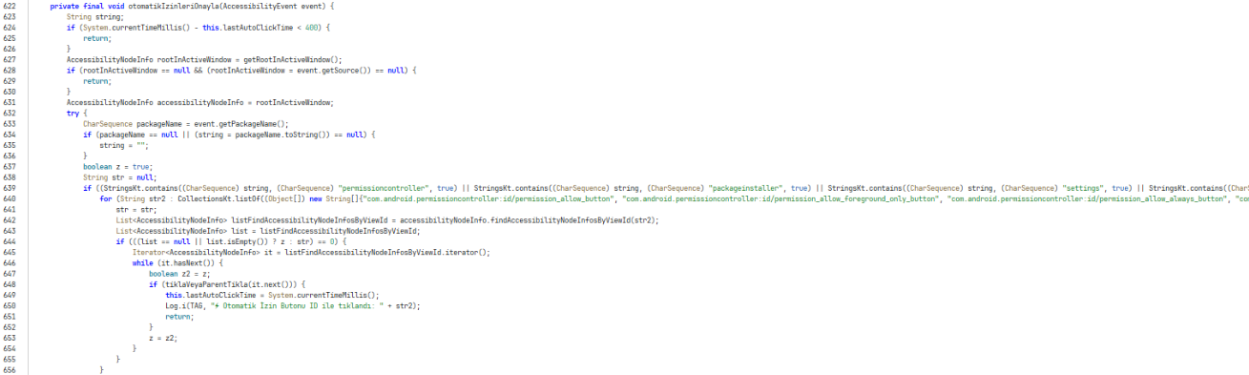
otomatikIzinleriOnayla() – package scope check and 11 view ID list
It pushes input in four primitive types, where each of them has its shell fallback:
- Tap and long press with performClick() for 20-1000 ms
- Swipe with performSwipe() method, duration 50-2000ms
- Text input with metinYaz() method by trying node injection and then clipboard, shell as the final step
Clipboard option gives the label “K7RemoteText”, which can be recovered as forensic evidence. Input injection works even if the accessibility service is removed as long as the attacker has access to the shell. Log tag “K7Erisilebilirlik”.
Command and Control Loop
Service K7KesintisizIletisimServisi is responsible for the polling loop enabling remote control of the sample. This service launches both socket client and watchdog threads from the onCreate() method. Socket client fails quietly. The polling loop remains unchanged.
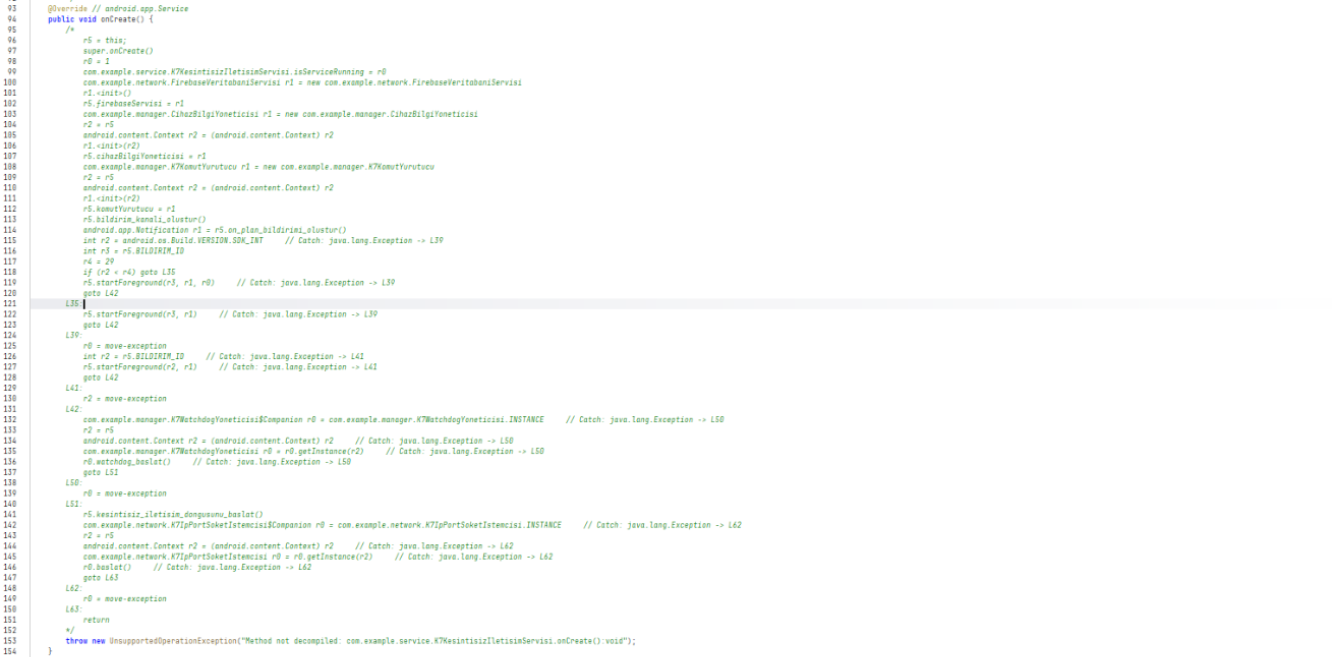
K7KesintisizIletisimServisi.onCreate() – service startup and socket client initialization
- Calls /commands/{id}.json every 2000ms without jitter or exponential backoff, approx 43,200 polls per registered device per day
- One out of three polls includes a telemetry heartbeat
- The retrieved commands are handed to K7KomutYurutucu.komut_yurut() which resolves 152 command aliases using sparse switch based on String.equals()
- Confirmation of execution using a PATCH to /commands/{id}/{command_name}.json
- Has its own OkHttp client separate from the shared one
- On the other hand, onDestroy() invokes startForegroundService() on itself – the third way to restart without involving START_STICKY and the watchdog broadcast.
The foreground notification which keeps this service running is the most trusted single signal among all signals:
- Channel ID: k7_kesintisiz_servis_kanali / Channel name: Sistem Hizmeti
- Notification ID: 7771 / Importance: IMPORTANCE_MIN / Visibility: VISIBILITY_SECRET
- Title: Sistem Koruması / Body: Cihaz koruma ve eşitleme hizmeti devrede.
- Display badge & timestamp: off
Live Communications Interception
The SmsAlicisi component registers as priority 999 when handling incoming SMS without invoking abortBroadcast(), hence is a passive tap that has no impact on delivery to the proper messaging app. Incoming messages are posted to data/{deviceId}/sms_live/{timestamp}.json. The receiver invokes goAsync() for asynchronous processing, which is the right way of implementing a broadcast receiver that will perform network operations.
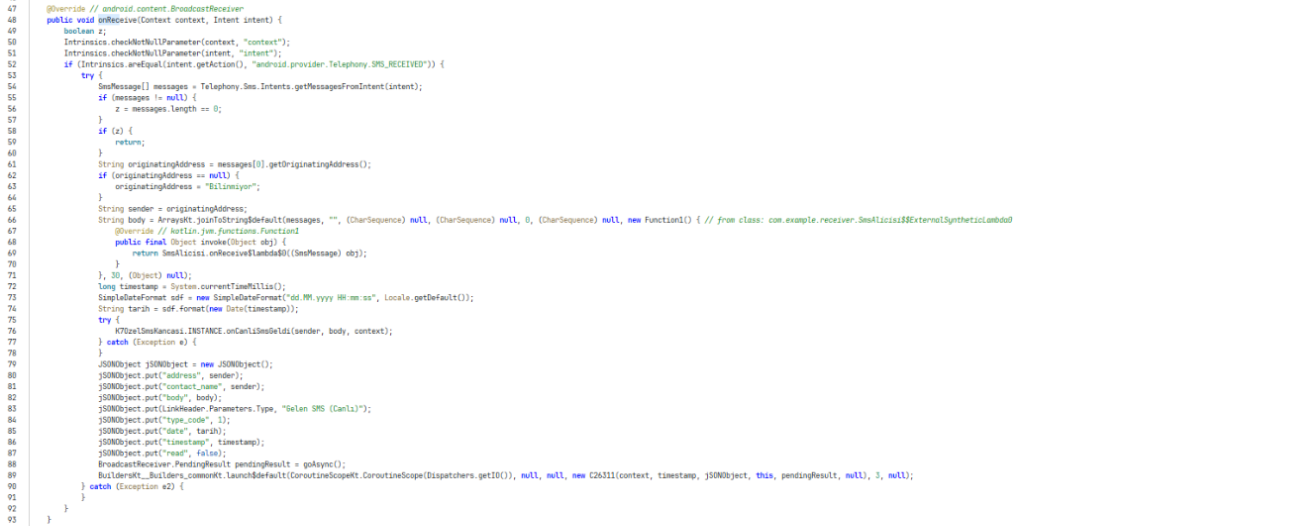
SmsAlicisi.onReceive() – priority 999 registration and eight-field Firebase write
K7BildirimDinleyiciServisi listens to every posted notification in all apps:
- Implemented using CoroutineScope based on SupervisorJob, hence a failure in any dispatching will not terminate further captures
- Notifications that have both empty title and text after parsing are silently ignored
- Calls to data/{deviceId}/notifications/{timestamp}.json with its own OkHttp client
- onNotificationRemoved() is stubbed, so removed notifications are not being tracked
There are seven data values for each notification:
- address: originating phone number
- contact_name: matches address, but there is no contact look-up
- body: full message text
- type: constant string “Gelen SMS (Canlı)”
- type_code: hardcoded integer 1
- Date: string dd.MM.yyyy HH:mm:ss
- timestamp: epoch milliseconds
- read: hardcoded false
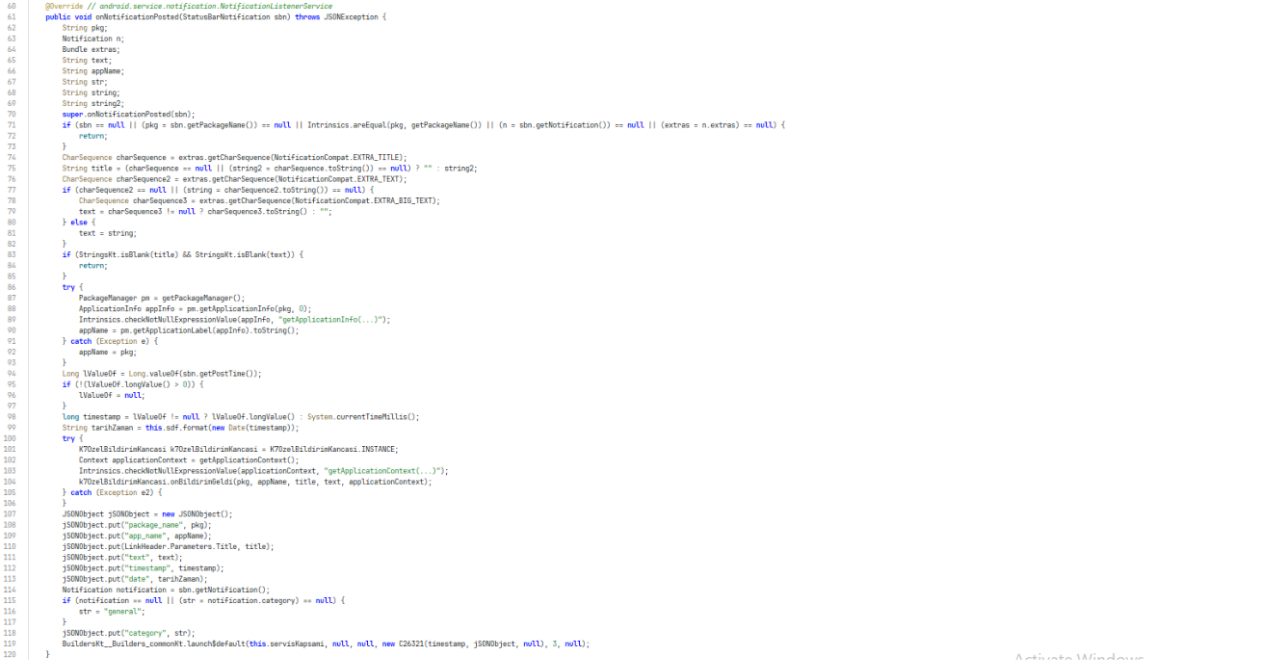
K7BildirimDinleyiciServisi.onNotificationPosted() – seven captured notification fields
The log tag is K7BildirimDinleyiciServisi.
Batch Data Collection
There are seven types of device data gathered upon operator command, each limited to a certain number of records. Call logs, SMS and gallery images have a limit of 300 records, resolved by AnimationConstants.DefaultDurationMillis, a constant of Jetpack Compose animations that is equal to 300 milliseconds. Static code analyzers that do not resolve this reference will misinterpret the limit as animation duration.
| Category | Cap | Manager |
|---|---|---|
| Contacts | 500 records | RehberYoneticisi |
| Call logs | 300 records, 8 fields per entry, 6 call types classified | AramaKayitYoneticisi |
| SMS | 300 records | SmsYoneticisi |
| Gallery images | 200 records, base64 encoded | Gallery manager |
| Installed applications | 50 records via PackageManager.getInstalledApplications() | K7OzelKomutKancasi |
| Browser history | 300 records per target from SQLite | K7TarayiciKlonlayici |
| Device metadata | Collected on registration, updated each heartbeat | CihazBilgiYoneticisi |
All data is stored in Firebase as data/{deviceId}/, excluding the browser profile content which is socket-only and inaccessible in this release.
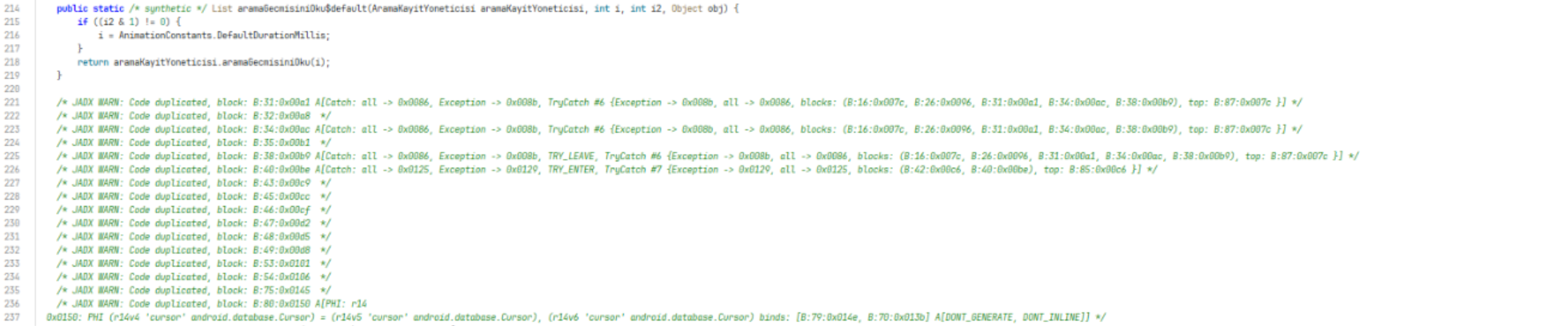
aramaGecmisiniOku() – AnimationConstants.DefaultDurationMillis as the default record cap
Call Origination
AramaKayitYoneticisi.numaraAra() method makes outgoing phone calls to any operator-provided number. Five command aliases:
-
- DIAL_PHONE and
ARA
-
- provide access to this functionality.
- class=”post-cust-list”>
- Removes spaces and hyphens from the input before calling; returns false when there is no input
- When android.permission.CALL_PHONE is present: ACTION_CALL directly calls without any further action needed from the user
- If the permission is not there: ACTION_DIAL invokes the dialer screen with the phone number filled in, needing one button press to finish
- FLAGS are FLAG_ACTIVITY_NEW_TASK for both intents with identical numbers
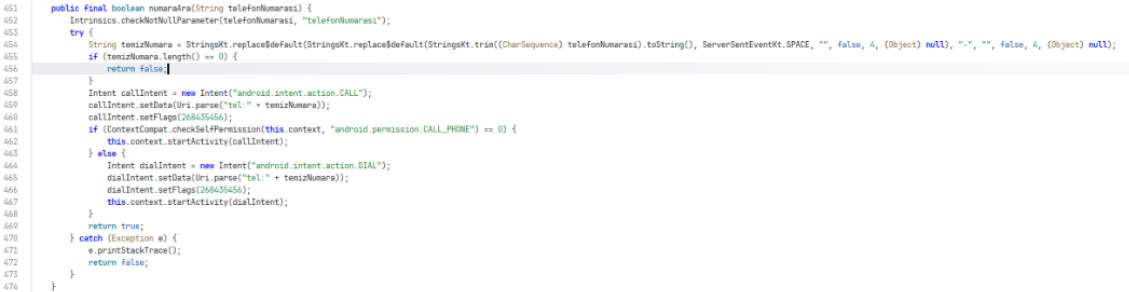
numaraAra() – sanitization, CALL_PHONE check and ACTION_CALL / ACTION_DIAL branches
The ability to create a silent phone call of any number is a live audio stream without using the microphone streaming mechanism, which depends on the socket and is passive in this version. With the presence of CALL_PHONE, no user interaction is needed anywhere.
Persistence Mesh
Seven restart mechanisms operate independently. Removal of any will leave the others alive.
| Mechanism | Implementation | Interval | |
|---|---|---|---|
| START_STICKY | onStartCommand() return value | Android managed | |
| onDestroy() self-restart | Direct startForegroundService() call | Immediate | |
| onTaskRemoved() broadcast | ACTION_RESTART_SERVICE sent to K7WatchdogReceiver | Immediate | |
| AlarmManager | setExactAndAllowWhileIdle(ELAPSED_REALTIME_WAKEUP) | 60 seconds | |
| WorkManager – watchdog | k7_periodic_watchdog_work, no constraints, 5 minute flex | 15 minutes | |
| WorkManager – sync | k7_cihaz_senkronizasyon_gorevi, network required | 15 minutes minimum | |
| Boot persistence | AcilisAlicisi – six boot actions | On restart |
Startup mechanisms established from the source code:
- android.intent.action.BOOT_COMPLETED,
- android.intent.action.LOCKED_BOOT_COMPLETED,
- android.intent.action.MY_PACKAGE_REPLACED,
- android.intent.action.QUICKBOOT_POWERON,
- com.htc.intent.action.QUICKBOOT_POWERON
- android.intent.action.REBOOT.
In case of any boot, three actions occur in this order: K7KesintisizIletisimServisi gets started, K7WatchdogYoneticisi.watchdog_baslat() occurs and SenkronizasyonYoneticisi.periyodik_senkronizasyonu_baslat() occurs.
The listener K7WatchdogReceiver waits for six exported actions: ACTION_RESTART_SERVICE, ACTION_WATCHDOG_PING, USER_PRESENT, SCREEN_ON, BOOT_COMPLETED and MY_PACKAGE_REPLACED. Due to the registration with USER_PRESENT and SCREEN_ON the watchdog performs a liveness check upon each device unlock and each screen turn-on, and not just by an explicit command. isServiceRunning() is used in conjunction with the call to baslat(). watchdog_zamanlayicisini_tazele() always is called irrespective of the result. Log tag is K7WatchdogMgr.
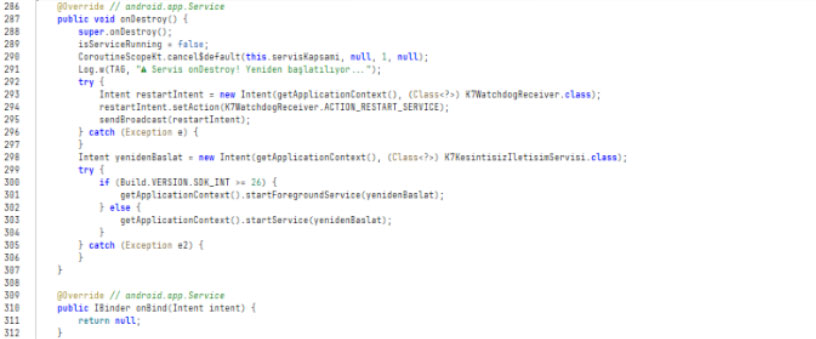
K7KesintisizIletisimServisi.onDestroy() – direct startForegroundService() self-restart
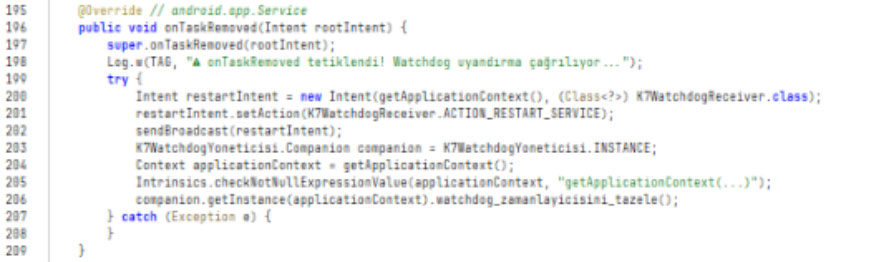
K7KesintisizIletisimServisi.onTaskRemoved() – watchdog broadcast restart trigger
Device Admin and Remote Lock
Device Admin policy enforces force-lock, wipe-data and watch-login. wipe-data is enforced but never used anywhere in the code. Remote locking is performed using two separate paths:
| Path | Mechanism | Requirement |
|---|---|---|
| Primary | DevicePolicyManager.lockNow() | Active Device Admin |
| Secondary | performGlobalAction(8) via accessibility service | Android 8 and above, no Device Admin needed |
Revocation of Device Admin does not turn off locking functionality when accessibility service is still active.
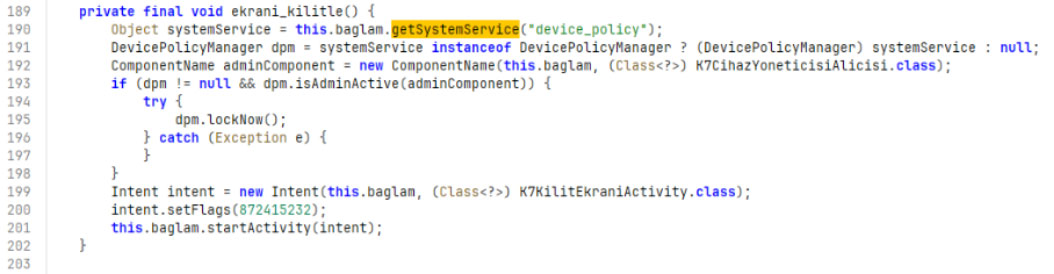
ekrani_kilitle() – lockNow() primary path and K7KilitEkraniActivity launch
Lock screen activity verified from source:
- Sets FLAG_SHOW_WHEN_LOCKED, FLAG_DISMISS_KEYGUARD and FLAG_KEEP_SCREEN_ON in onCreate()
- Uses setShowWhenLocked() and setTurnScreenOn() for Android 8.1 and higher
- Back button prevented from working via OnBackPressedCallback with blank body
- Headline: “CİHAZ KİLİTLENDİ” / Subtext: “Ebeveyn Komuta Merkezi Tarafından Kapatıldı“
Unlock broadcast com.k7.client.ACTION_UNLOCK is exported with no permissions needed for all API levels.
Self-Destruct and Stealth
uygulamayi_kaldir_ve_imha_et() follows six sequential steps when receiving SELF_DESTRUCT or KOMPLE_SIL messages:
- Remove Device Admin via DevicePolicyManager.removeActiveAdmin()
- Activate MainActivity and LauncherAlias – occurs prior to any uninstall process, even the root method
- Run four shell commands for uninstall in succession until the first success
- Clear k7_stealth_prefs and k7_engelli_uygulamalar settings and recursively remove cache
- If shell fails then try android.intent.action.DELETE with android.intent.action.UNINSTALL_PACKAGE as backup interface
- Stop K7KesintisizIletisimServisi
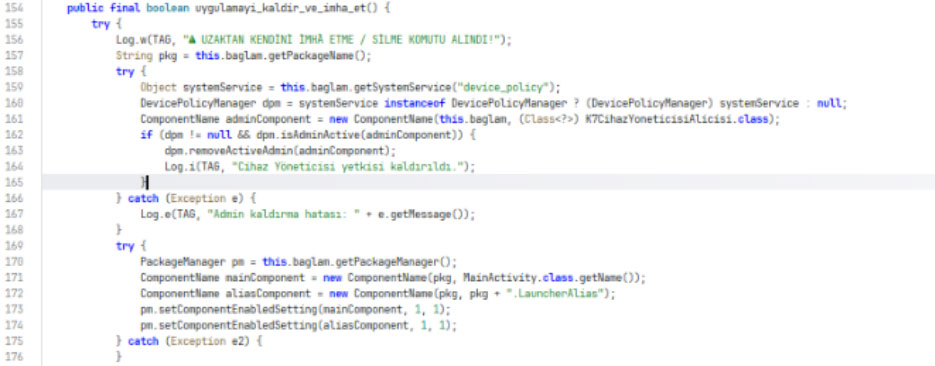
uygulamayi_kaldir_ve_imha_et() – Device Admin removal and icon re-enable before uninstall
An icon which had been disabled but is suddenly enabled on the watchful device points towards self-destruction being initiated rather than normal usage. Step 2 always executes prior to all other paths.
uygulamayi_gizle() stealth behavior:
- Disables LauncherAlias followed by MainActivity sequentially
- Invokes moveTaskToBack(true) followed by finishAndRemoveTask() in the running instance
- Writes is_stealth_hidden = true to k7_stealth_prefs
- auto_hide_on_completed will be true when called through is_otomatik_gizleme_aktif() but there seems to be no event which triggers uygulamayi_gizle() using the said value
- In the above snippet, the log tag used is K7Gizlilik.
Root Shell and Privilege Escalation
The root detection process will take place in two steps using isRootVarMi():
Checks eight pre-defined paths for su binary files:
- /system/bin/su,
- /system/xbin/su,
- /sbin/su,
- /system/sd/xbin/su,
- /system/bin/failsafe/su,
- /data/local/xbin/su,
- /data/local/bin/su, /data/local/su – returns true on first path match
If all eight paths are missing: runs su -c id command and scans result for uid=0 or root string
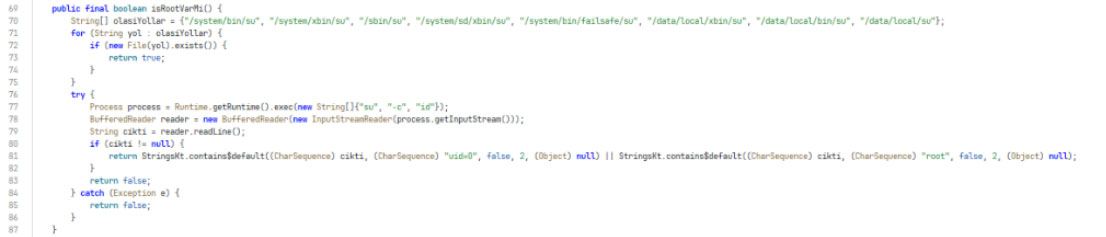
isRootVarMi() – eight su binary path checks and su -c id fallback
rootKomutuCalistir() behavior:
- Runs a root shell by calling Runtime.exec(“su”) method
- Writes the command and exit to standard input stream
- Reads the standard output and writes it to a StringBuilder, prepending standard error with [ERR] prefix
- Gets the combined output after trimming whitespaces and returns it as a string
- Engine executing ROOT_COMMAND, EXEC_ROOT, SU_EXEC
privAppOlarakYukle() installs the payload into /system/priv-app/K7RAT/K7RAT.apk
- mount -o remount,rw /system
- mount -o remount,rw /
- mkdir -p /system/priv-app/K7RAT
- Copy apk file to /system/priv-app/K7RAT/K7RAT.apk
- chmod 755 /system/priv-app/K7RAT
- chmod 644 /system/priv-app/K7RAT/K7RAT.apk
- chown -R root:root /system/priv-app/K7RAT
- mount -o remount,ro /system
This remount operation is an anti-forensic clean up process. This needs a reboot for the operation to be effective. Tag name is K7SistemEntegrasyon.
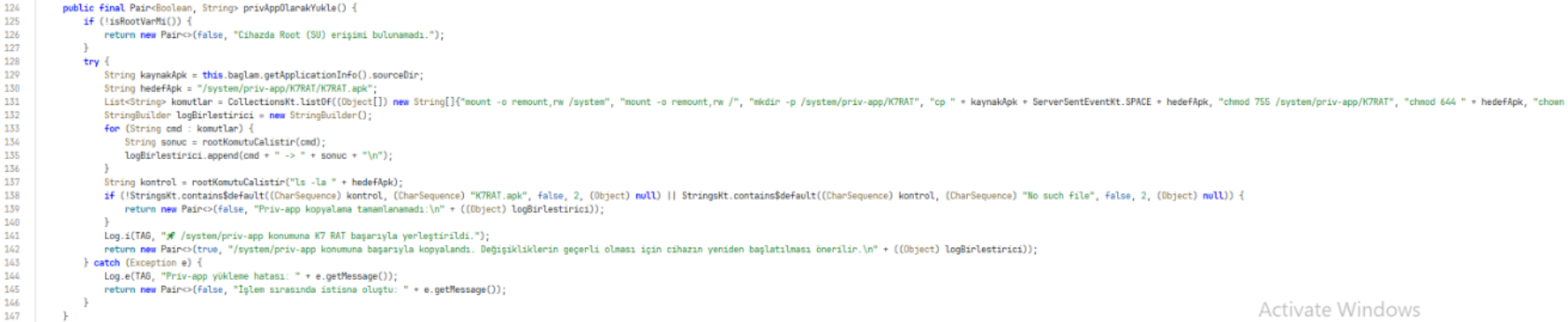
privAppOlarakYukle() – eight-command priv-app installation sequence
HVNC Hidden Browser
K7HvncYoneticisi is a full hidden remote browser application. A WebView component is initialized without a surface view; it is created programmatically at 1024×768 and is rendered to a canvas object.
Security vulnerability of WebView verified from source:
- setMixedContentMode(MIXED_CONTENT_ALWAYS_ALLOW) – Load HTTP content in HTTPS pages without any limits
- setAcceptThirdPartyCookies(webView, true) – Accept third party cookies from all sites
- All JavaScripts and DOM storage are enabled along with database access
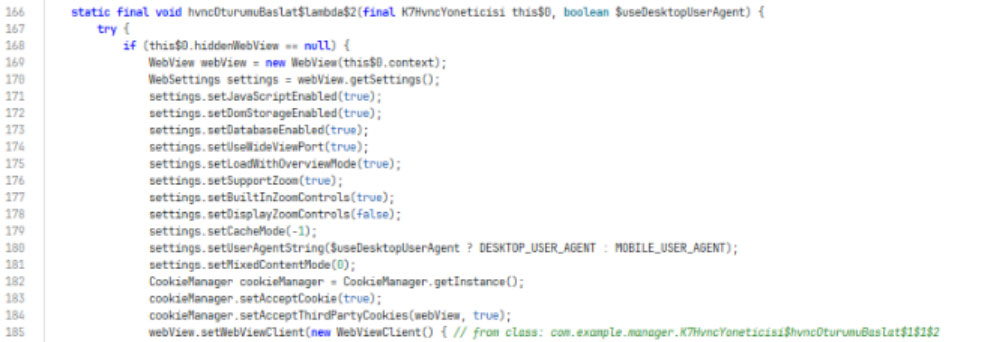
hvncOturumuBaslat() – WebView security weakening and user agent assignment
13 operator-facing capabilities exposed:
- Session start and stop
- Loading URL – urlYukle() function accepts javascript: URLs as well
- JavaScript execution with results back
- Touch events with normalized coordinates
- Scrolling and text entry using JavaScript DOM injections
- Going back, going forward and reloading the page
- anlikCerezleriCek() – obtains live session cookies using CookieManager.getInstance().getCookie(url) and returns the complete raw cookie string with session token for the requested URL

anlikCerezleriCek() – CookieManager.getInstance().getCookie() live session cookie theft
| Agent | String |
|---|---|
| Desktop (default) | Mozilla/5.0 (Windows NT 10.0; Win64; x64) AppleWebKit/537.36 (KHTML, like Gecko) Chrome/122.0.0.0 Safari/537.36 |
| Mobile | Mozilla/5.0 (Linux; Android 14; Pixel 8 Pro) AppleWebKit/537.36 (KHTML, like Gecko) Chrome/122.0.6261.64 Mobile Safari/537.36 |
All data is outputted via the socket alone: HVNC_STATUS_UPDATE, HVNC_SESSION_END and HVNC_JS_RESULT. Decompile fails for frame loop coroutine after 344 instruction units – frame interval cannot be determined from this session. Log tag is K7HvncYoneticisi.
Live Screen Streaming
CanliEkranAkisYoneticisi provides a complete chain from MediaProjection to VirtualDisplay and then into JPEG format. There are two defects that make this non-functional separately:
| Defect | Mechanism | Scope |
|---|---|---|
| Application context bug | Singleton getter calls getApplicationContext()- startForeground() guarded by instanceof Service is permanently unreachable | Android 11 and above; MediaProjectionManager.getMediaProjection() throws silent SecurityException |
| Socket dead | Frames transmit exclusively via SCREEN_STREAM_CHUNK – no Firebase path exists for frame data | All Android versions |
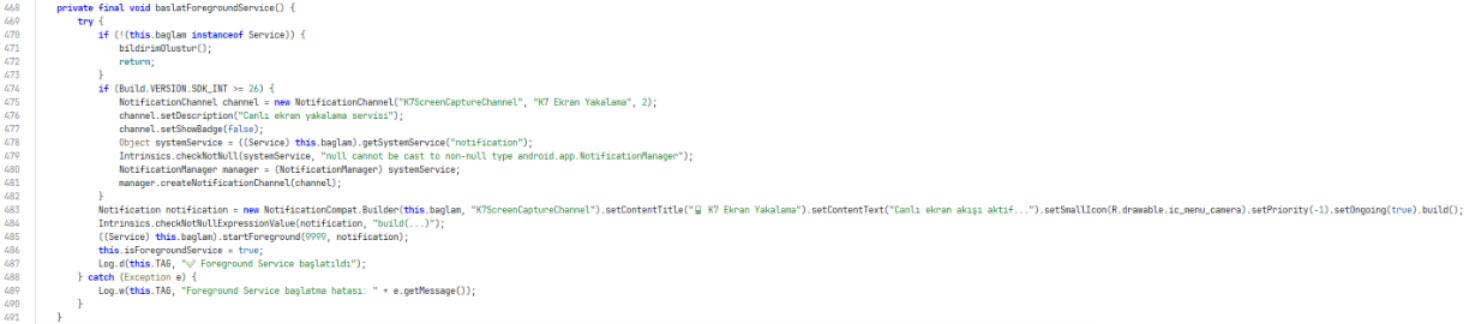
baslatForegroundService() – instanceof Service check permanently blocking startForeground()
Accessing a screenshot via the AccessibilityService.takeScreenshot() is a separate, independent implementation and unaffected by either of the above defects – works on Android 11+. Log tag is K7CanliEkran.
Browser Profile Cloning
K7TarayiciKlonlayici aims at 12 browser instances including browsers from Chromium, Firefox, Samsung, Yandex and UC groups. In default configuration, canRead() will return false for the target data directory and consequently, the staging folder will remain empty while the function will exit successfully.
The following three constraints hold true regardless of whether root is achieved:
- Firefox – sifreleriAyrdir() opens logins.json file as a SQLite database; Firefox utilizes JSON format; an exception is thrown immediately.
- Bookmarks – bookmarksArray is defined and stored in the result array but is never filled up via any extraction method; remains empty whatever the target
- Chrome passwords – password_value field is encrypted with AES-256-GCM algorithm using an Android Keystore-bound key; blob raw data is either [Kayıtlı Parola] or garbage ciphertext forced to become a string
| Egress path | Content |
|---|---|
| Socket – CLONED_PROFILE_DATA_RESPONSE | Full archive |
| Firebase – data/{id}/cloned_profiles/{pkg}.json | Cookie count, login count, history count only |
Incomplete clones create recoverable forensic evidence in cache in the form of the clone_{package}_{timestamp} staging directories and k7_profile_{package}.zip files. The log tag is K7TarayiciKlonlayici.

CanliSesAkisYoneticisi – confirmed audio capture constants
Camera and Microphone Streaming
| Component | Implementation | Default Parameters |
|---|---|---|
| CanliKameraAkisYoneticisi | Full Camera2 pipeline, front and back lens, torch control via CaptureRequest.FLASH_MODE on back lens only | 15fps, 60 JPEG quality, 640×480 |
| CanliSesAkisYoneticisi | AudioRecord capture – recording coroutine failed to decompile at 660 instruction units; buffer and socket send logic unverifiable | 16kHz, mono, PCM16 |
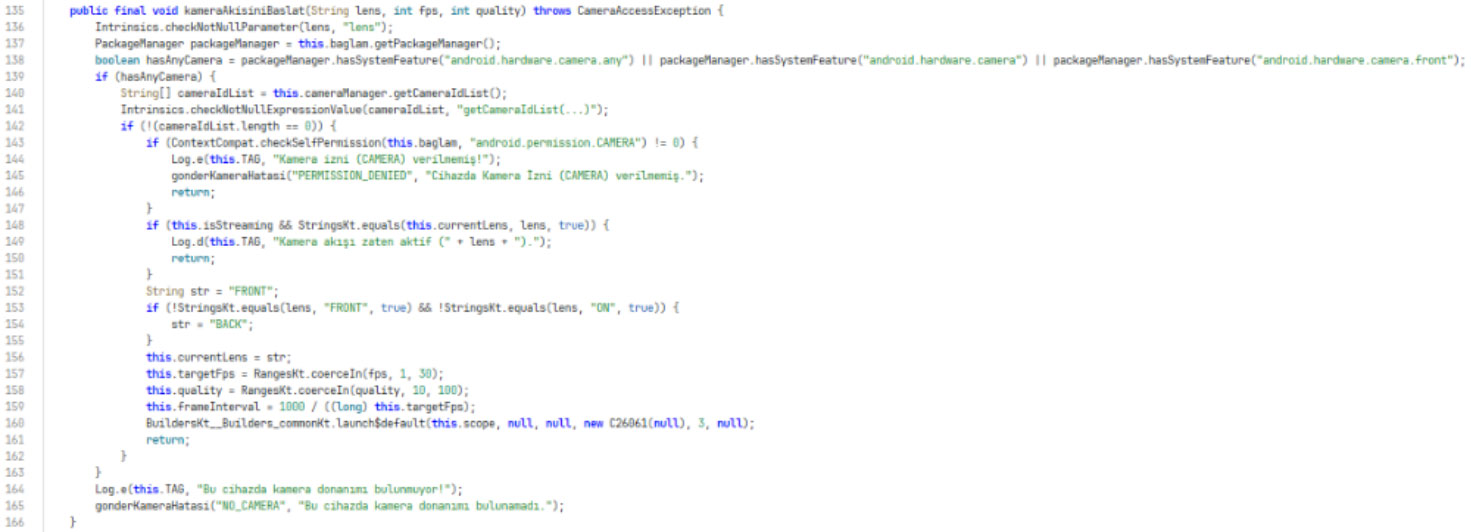
kameraAkisiniBaslat() – direct coroutine launch with no foreground service declaration
Inactivity in both components stems from the same two flaws:
- Neither class launches a foreground service – an Android camera foreground service must be declared and started to work in the background since Android 9, and similarly, an Android microphone foreground service since Android 11.
- Both use only the dead socket channel.
The tag names are K7CanliKamera and K7CanliSes.
Custom Command Hooks
Fourteen out of fifteen hook class in com.example.custom are only stubs. They create FirebaseVeritabaniServisi in the constructor and never call veri_yukle(). The parental control suite upon which the pretense relies for credibility is not even present in any of them.
K7OzelKomutKancasi is the one and only implemented feature and available via a second dispatcher that consists of 29 aliases separate from the primary one consisting of 152 entry points.
| Commands | Capability |
|---|---|
| 1-4 | Hardware identity, installed apps (50 cap), network state, storage statistics |
| 5-8 | Volume max, vibration, torch on/off |
| 9-10 | Stubs – slot 10 commented as extensibility placeholder |
Another three features are implemented in managers but stub-terminated right where they are hooked. CanliAramaAlicisi implements the entire priority 999 call state machine with all transitions: outgoing call setup, incoming call ring, answering and termination with all of them leading to K7CanliAramaKancasi method, which returns immediately without generating any output. KonumTakipYoneticisi is the entire Haversine geofencing implementation which leads to K7KonumTakipKancasi.guvenliBolgeKontrolEt() method, which also returns immediately. In both cases, the real logic works but the result is dropped. It all shows the same coding approach throughout: building the infrastructure before implementing the operator hook logic to access it.
5. Assembly and Attack Chain
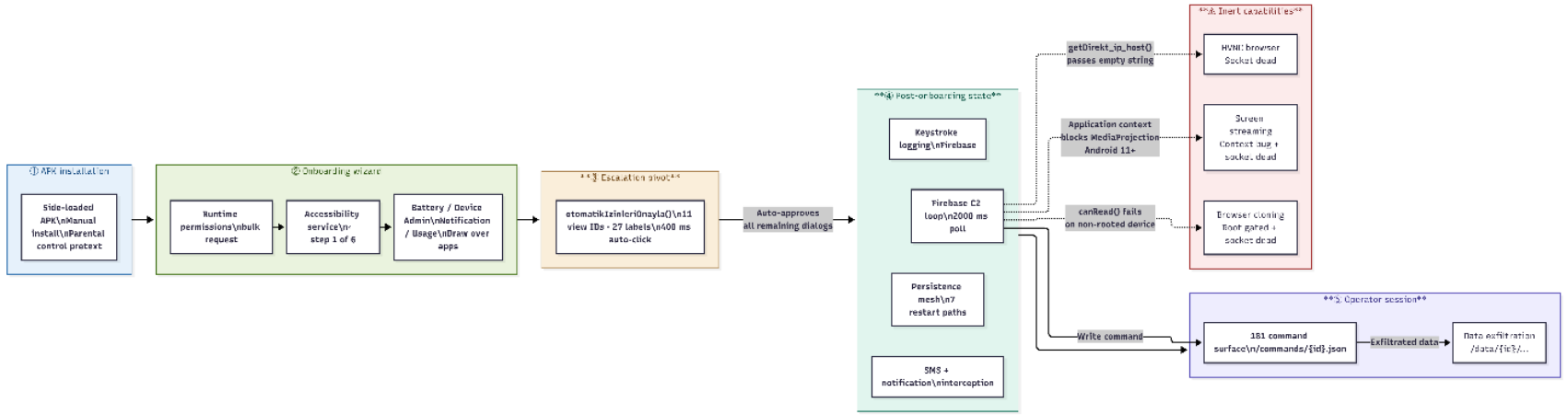
K7 RAT attack chain – installation through operator session with inert capability annotations
The diagram traces the full attack chain across five stages, detailed in the sections that follow.
- Installation and the onboarding wizard are covered in Section 5.1. The chain begins with a side-loaded APK under a parental control pretext, advancing the victim through six permission steps with the accessibility service first.
- The escalation pivot is covered in Section 5.2. The accessibility service grant in step one hands control to otomatikIzinleriOnayla(), which auto-approves every subsequent dialog within 400 milliseconds, eliminating any further victim participation.
- The post-onboarding state is covered in Section 5.3. Keystroke logging, SMS and notification interception, the Firebase polling loop and the persistence mesh all activate simultaneously.
- The operator session is covered in Section 5.4. Commands arrive at /commands/{id}.json and exfiltrated data returns through /data/{id}/… across the full 181-command surface.
The three dotted arrows show where the chain breaks at the highest-capability tier. All three defects are documented in the architecture section (Section 3) and in the individual component sections (4.10, 4.11 and 4.12): the dead socket disabling HVNC, the Application context bug blocking screen streaming on Android 11 and above, and the canRead() failure silently emptying browser cloning output on non-rooted devices.
5.1. Installation and First Launch
K7 RAT comes in form of standard APK that must be manually installed. No vulnerability is used. At the first execution MainActivity launches IzinYoneticisi.otomatik_kurulum_baslat(), that proceeds with the victim through permissions via conditional cascade, not via sequential wizard. At each method call all previous conditions are checked from the top and proceed until the first unsatisfied condition is reached. Victim needs to go back to application after granting each permission.
The method starts with pre-step before requesting any sensitive permission. calisma_zamani_izinleri_eksik_mi() checks six runtime permissions at once: READ_SMS, READ_CONTACTS, READ_CALL_LOG, CAMERA, RECORD_AUDIO and ACCESS_FINE_LOCATION. In case of absence of any of them tum_calisma_zamani_izinlerini_toplu_iste() launches one requestPermissions() call and requests up to 18 permissions and method is returned. Onboarding process does not continue until all six of them are granted.
After satisfying runtime permissions, the method continues to pass through six sensitive permissions in this specific order:
| Step | Permission | Toast shown to victim |
|---|---|---|
| 1 | Accessibility service | “⚡ Lütfen listeden ‘K7 Uzaktan Kontrol Hizmeti’ni seçip açık yapınız.” |
| 2 | Battery optimization exemption | “⚡ Kesintisiz arka plan çalışması için ‘İzin Ver’ seçiniz.” |
| 3 | Device Admin activation | “⚡ ‘Bu cihaz yönetici uygulamasını etkinleştir’ seçeneğine basınız.” |
| 4 | Notification listener | “⚡ Listeden ‘{app_name}’ seçip bildirim erişimini açınız.” |
| 5 | Usage access | “⚡ Listeden ‘{app_name}’ uygulamasını bulup kullanım erişimini açınız.” |
| 6 | Draw over other apps | “⚡ Diğer uygulamalar üzerinde görüntüleme iznini açınız.” |
In all the six cases, the victim observes:
“✅ Tebrikler! Tüm izinler ve güvenlik ayarları eksiksiz tamamlandı.”
The screen capture consent request is not present in this process. The ekran_yakalama_izni_iste() function is available in the class; however, it is not used during the otomatik_kurulum_baslat() call.
The Escalation Pivot
The accessibility service grant in step 1 is the moment when the onboarding flow becomes automated. As soon as K7ErisilebilirlikServisi is connected, the onServiceConnected() function initializes the static instance reference and starts otomatikIzinleriOnayla() function to intercept all the accessibility events from the device. Any dialog requests in steps 2 through 6, including the Device Admin activation, become automatically accepted by the accessibility service using the 27-labels matching algorithm explained in section 4.1. One manual action by the victim in step 1 triggers all the remaining steps.
The MediaProjection consent is not requested by the onboarding wizard. ekranPaylasiminiBaslat() function in the MainActivity class is the bootstrap path for MediaProjection consent and gets called by the operator issuing a screen share command or IzinYoneticisi.ekran_yakalama_izni_iste() is invoked directly. Once the dialogue is shown, the accessibility service finds the labels “Şimdi başlat” and “Start now” in its set of 27 labels and clicks in 400 ms, without any interaction from the victim. This bootstrap path is independent from the onboarding wizard and can be launched anytime after the accessibility service initialization.
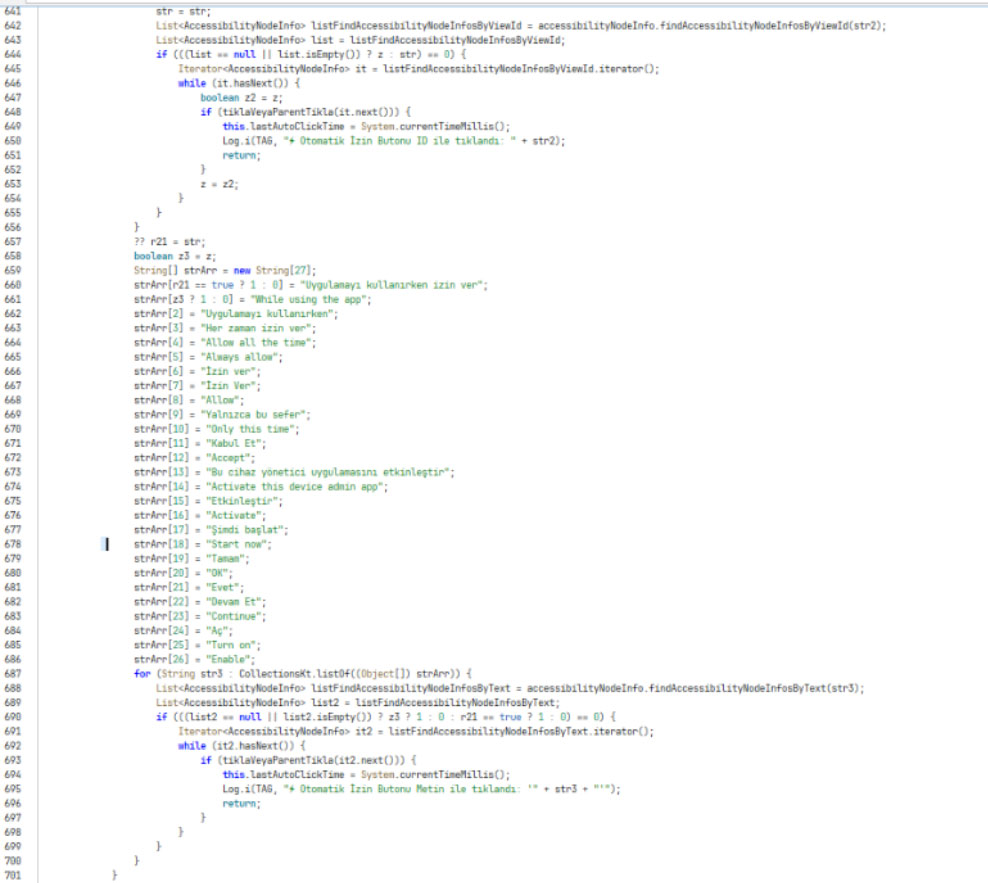
otomatikIzinleriOnayla() – 27-label set including Device Admin and MediaProjection dialog targets
Post-Onboarding State
After the permission sequence is completed, the device becomes ready in the following manner:
| Capability | Status | Channel |
|---|---|---|
| Notification interception | Active | Firebase |
| Keystroke logging | Active | Firebase + socket (socket dead) |
| SMS interception | Active | Firebase |
| Accessibility service – input injection, screenshot, auto-approval | Active | Local |
| Device Admin – remote lock | Active | Local |
| Firebase polling loop | Active – 2000ms interval | Firebase |
| AlarmManager persistence | Active – 60s rearm | Local |
| WorkManager jobs | Active – two jobs | Local |
| Boot persistence | Active – six actions | Local |
| Watchdog broadcasts | Active – two exported actions | Local |
| HVNC hidden browser | Implemented, inert | Socket dead |
| Live screen streaming | Implemented, inert | Socket dead and context bug |
| Camera streaming | Implemented, inert | No foreground service and socket dead |
| Microphone streaming | Implemented, inert | No foreground service and socket dead |
| Browser profile cloning | Implemented, inert | Root gated and socket dead |
Auto icon hiding does not happen in this phase. Although auto_hide_on_completed is set to true in is_otomatik_gizleme_aktif(), there is no check in the verified source code which will read this variable and call uygulamayi_gizle(). Icon is only hidden when the operator explicitly gives the command HIDE_APP_ICON.
Operator Session
All interactions with the operator go through the Firebase command channel. The operator pushes a command string to /commands/{deviceId}.json. The polling cycle will read it within 2000 milliseconds and then pass it to K7KomutYurutucu. Operator will receive confirmation of successful execution with PATCH to /commands/{deviceId}/{command_name}.json.
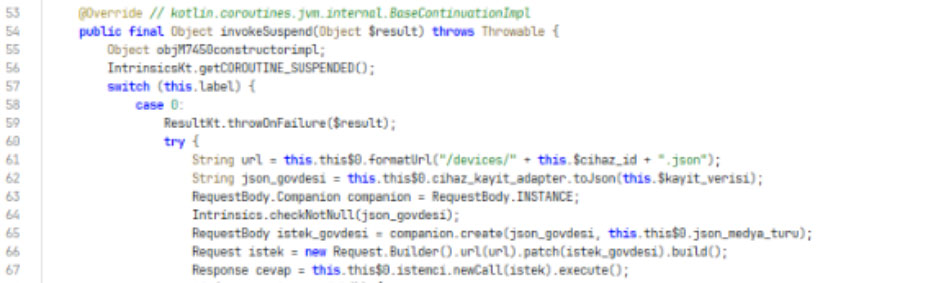
Firebase RTDB device registration write path – /devices/{id}.json
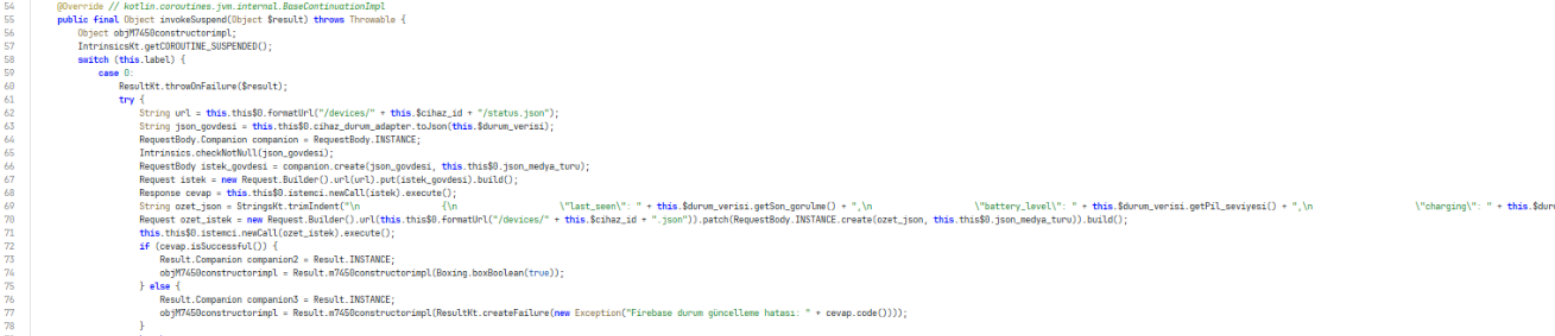
Firebase RTDB status update path – /devices/{id}/status.json
Notably, those functionalities that are operationally valuable within an attack chain are not presented among the main advertised capabilities in the product description by the vendor. Keystrokes logging, intercepting SMS and notifications, as well as making a phone call can be done immediately after the installation without additional steps. Those capabilities that do not work in the analyzed build are HVNC, screen streaming, camera and microphone capturing.
Operational Constraints
Two limitations arise from component interactions that cannot be seen in the marketing of the seller and that are not apparent from individual components examined in isolation.
Stealth mode and MediaProjection are incompatible with one another. uygulamayi_gizle() disables MainActivity CanliEkranAkisYoneticisi.ekranAkisiniBaslat() is only capable of getting to the MediaProjection consent dialogue via MainActivity.INSTANCE.getInstance(). In the absence of MainActivity that path is not possible. An attacker who enables stealth mode prior to sending the screen stream request will not see MediaProjection output. The screenshot through the accessibility pathway takeScreenshot() is unaffected as it goes through the service without the intermediary.
Self-destruct will turn back on the launcher icon prior to attempting uninstallation. The second step of the self-destruct procedure will re-enable MainActivity and LauncherAlias prior to the execution of the four shell commands. In case of successful uninstallation on a rooted device silent uninstallation will occur after the icon appears briefly. An icon that reappeared suddenly on a monitored device is a strong sign of the ongoing self-destruction process and not user activity.
6. Infrastructure and Command and Control
K7 RAT uses two C2 channels. Only one channel works. The working one is Firebase Realtime Database with HTTPS. The non-functional channel is TCP raw socket listening on port 7777 and made unreachable for good due to the host vulnerability in Section 3.
Encryption
The configuration parameters are protected by the static key XOR cipher repeated with base64 encoding and prefix ENC:. The key is verified by direct computation of the ciphertexts in the sample.
K7_SECURE_KEY_2026_V3.0_RAT_PROT (32-byte ASCII)
Given the naming in 2026_V3.0 it looks like there is versioned builder line for this malware. It is possible that there were previous V1 or V2 variants which used the same, or similar, scheme. In case when decryption returns a blank response the sample defaults to hard-coded identifiers such as k7-rat-remote and 1:1234567890:android:k7ratremote. The communication itself is clear text HTTPS, encryption is only applied to configuration constants.
Firebase Channel
Zero HTTP requests out of the three independent OkHttp clients have an authorization header, token in query string or pass through any kind of interceptor. Anybody who knows the database URL is able to read victim data and send commands. This is part of the template design rather than a mistake of an operator.
| RTDB Path | Method | Purpose |
|---|---|---|
| /devices/{id}.json | PATCH | Registration and summary beacon |
| /devices/{id}/status.json | PUT | Full status write – separate call from registration |
| /devices/{id}/rules.json | GET | Remote config pull |
| /devices/{id}/live_keystroke.json | PUT | Live keystroke stream |
| /devices/{id}/hardware_info.json | PUT | Hardware identity |
| /devices/{id}/installed_apps.json | PUT | Installed application list |
| /devices/{id}/network_status.json | PUT | Network state |
| /devices/{id}/storage_info.json | PUT | Storage statistics |
| /devices/{id}/diagnostics.json | PUT | Diagnostic data |
| /devices/{id}/is_locked.json | PUT | Lock state |
| /commands/{id}.json | GET | Command ingest |
| /commands/{id}/{command_name}.json | PATCH | Command acknowledgment |
| /data/{id}/contacts.json | PUT | Contact exfiltration |
| /data/{id}/call_logs.json | PUT | Call log exfiltration |
| /data/{id}/sms.json | PUT | SMS batch exfiltration |
| /data/{id}/sms_live/{timestamp}.json | PUT | Live SMS interception |
| /data/{id}/notifications/{timestamp}.json | PUT | Live notification interception |
| /data/{id}/installed_browsers.json | PUT | Browser inventory |
| /data/{id}/cloned_profiles/{pkg}.json | PUT | Clone counts only, never content |
| /usage/{id}/{date}.json | PUT | Usage statistics – undocumented in seller listing |
| /devices/{id}/live_location.json | PUT | Live location stream – 5s foreground, 30s background |
| /devices/{id}/location.json | PUT | Single Location fix |
Both registration and status update writes use separate HTTP requests, both have a liveness beacon with last_seen, battery_level, charging and online properties.
Socket Channel
Dead in this build. All capabilities listed below produce zero output in the current sample. These packet types can be used as detection signatures for any variant which doesn’t suffer from host defects.
| Packet Type | Key Fields | Notes |
|---|---|---|
| DEVICE_HELLO | type, device_id, model, android_version, battery_level, is_charging, timestamp | Sent first on every connection attempt regardless of capability state |
| LIVE_KEY | type, device_id, package, app_name, key, text, timestamp | Keystroke stream |
| SCREEN_STREAM_CHUNK | type, device_id, frame_id, width, height, format, data, timestamp | 100ms interval at default 10fps |
| SCREEN_STREAM_END | type, device_id, timestamp | Stream termination |
| HVNC_FRAME_CHUNK | type, device_id, frame_id, width, height, url, title, data, timestamp | Hidden browser frames |
| HVNC_STATUS_UPDATE | type, device_id, status, message, url, title, timestamp | Page load events |
| HVNC_SESSION_END | type, device_id, timestamp | Session close |
| HVNC_JS_RESULT | type, device_id, script, result, timestamp | JavaScript execution results |
| BROWSER_PROFILES_LIST_RESPONSE | type, device_id, browsers, timestamp | Installed browser inventory |
| CLONED_PROFILE_DATA_RESPONSE | type, device_id, data, timestamp | Full clone archive – never reaches Firebase |
| CAMERA_STREAM_CHUNK | type, device_id, frame_id, width, height, lens, format, data, timestamp | Camera frames |
| CAMERA_STREAM_END | type, device_id, timestamp | Stream termination |
| CAMERA_ERROR | type, code, message, timestamp | Error reporting – no device_id field |
| AUDIO_STREAM_CHUNK | type, sample_rate, channels, chunk_size, data, timestamp | Only packet type with no device_id field |
DEVICE_HELLO is the best detection point as it will always appear in every connection attempt and therefore is observable from a partially functional build.
Hardcoded User Agents
Both are static fields in K7HvncYoneticisi. Desktop is the default.
| Agent | String |
|---|---|
| Desktop (default) | Mozilla/5.0 (Windows NT 10.0; Win64; x64) AppleWebKit/ |
| Mobile | Mozilla/5.0 (Linux; Android 14; Pixel 8 Pro) AppleWebKit/537.36 (KHTML |
A desktop Windows Chrome 122 user agent originating from a mobile carrier IP, in the context of a session that claims an Android device fingerprint, is an anomaly. The version string Chrome 122 dates the builder’s construction to approximately Q1 2024.
Firebase Infrastructure
Decrypted config reveals project ID k7rat-912fa and RTDB hostname https://k7-default-rtdb.firebaseio.com, both listed as network IOCs in Section 7.2. No attempt was made to query, read from, or write to the database. As zero authentication is required on all request paths, any such action would be unauthorized even if performed in good faith. The right course of action is to contact Google’s Firebase abuse department in advance of or concurrent with publishing this advisory.
7. TTPs and Indicators of Compromise
MITRE ATT&CK for Mobile Mapping
K7 RAT exploits nine ATT&CK for Mobile tactics. The table below includes only those techniques confirmed in the source code. Functional status separates between functionality that runs in this build and that which is implemented but inactive due to the three issues found in the architecture section. This distinction is significant to the defenders as the inactive functions are one line patch away from being activated.
By far, the largest share of techniques is in the domains of Collection and Persistence. That follows the threat model of this sample as K7 RAT is a surveillance malware with multiple layers of persistence making it hard to uninstall. The high-end techniques, marketed by sellers such as HVNC, screen streaming, and camera capture are inactive. The active techniques, keystroke logging, SMS interception, notification capture and location tracking, have been somewhat neglected in the marketing material.
| Tactic | Technique ID | Technique Name | Implementation |
|---|---|---|---|
| Initial Access | T1476 | Deliver Malicious App via Other Means | Side-loaded APK, parental control pretext, coached installation wizard |
| Execution | T1575 | Native Code | Android runtime execution following accessibility service activation |
| Execution | T1603 | Scheduled Task/Job | AlarmManager and WorkManager periodic jobs |
| Persistence | T1402 | Broadcast Receivers | Six boot completion actions in AcilisAlicisi |
| Persistence | T1624 | Event Triggered Execution | K7WatchdogReceiver exported restart, onDestroy() self-restart, START_STICKY |
| Privilege Escalation | T1626 | Abuse Elevation Control Mechanism | Device Admin via coached onboarding auto-approved by accessibility service |
| Privilege Escalation | T1626 | Abuse Elevation Control Mechanism | Priv-app install to /system/priv-app/K7RAT/K7RAT.apk via root shell |
| Defense Evasion | T1628 | Hide Artifacts | uygulamayi_gizle() disables MainActivity and LauncherAlias |
| Defense Evasion | T1630 | Indicator Removal on Host | Self-destruct clears prefs and cache, system remount to read-only post priv-app install |
| Defense Evasion | T1406 | Obfuscate or Encode Data | XOR cipher with 32-byte key, base64 encoded, ENC: prefixed constants |
| Credential Access | T1417 | Input Capture | Keystroke logging via onAccessibilityEvent() type 16 across all applications |
| Credential Access | T1414 | Steal Application Access Token | Session cookie theft via CookieManager.getInstance().getCookie(url) |
| Credential Access | T1412 | Capture SMS Messages | SmsAlicisi priority 999 interception of all incoming SMS |
| Credential Access | T1409 | Stored Application Data | Browser profile cloning targeting 12 browsers, saved passwords up to 500 entries |
| Discovery | T1418 | Software Discovery | Installed application enumeration via PackageManager.getInstalledApplications() |
| Discovery | T1422 | System Network Configuration Discovery | WiFi, cellular and VPN state via ConnectivityManager |
| Discovery | T1426 | System Information Discovery | Build fields, storage statistics, battery and charging state |
| Collection | T1432 | Access Contact List | Contact exfiltration capped at 500 records |
| Collection | T1433 | Access Call Log | Call log exfiltration capped at 300 records, six call types classified |
| Collection | T1430 | Location Tracking | Live location streaming via canliKonumTakibiBaslat() at a 5 second foreground interval, 30 second background interval, with distance minimums of 5 meters and 10 meters respectively |
| Collection | T1429 | Capture Audio | 16kHz mono PCM16 audio via AudioRecord |
| Collection | T1512 | Video Capture | Camera2 pipeline, front and back lens, 15fps default |
| Collection | T1513 | Screen Capture | AccessibilityService.takeScreenshot() on Android 11+, screencap -p fallback |
| Collection | T1516 | Input Injection | Tap, swipe, long press, text entry via accessibility gestures with shell fallbacks |
| Command and Control | T1436 | Commonly Used Port | Firebase HTTPS on port 443, raw TCP socket on port 7777 |
| Command and Control | T1437 | Standard Application Layer Protocol | Firebase Realtime Database REST API over HTTPS, zero authentication |
| Command and Control | T1521 | Encrypted Channel | XOR encrypted configuration constants; C2 traffic itself is plaintext HTTPS |
| Exfiltration | T1646 | Exfiltration Over C2 Channel | All data exfiltration routes through Firebase REST or dead socket |
| Impact | T1582 | SMS Control | Remote SMS interception, all incoming SMS captured and exfiltrated |
| Impact | T1471 | Data Encrypted for Impact | Device locking via DevicePolicyManager.lockNow() and performGlobalAction(8) |
| Impact | T1447 | Delete Device Data | Self-destruct sequence issuing four shell uninstall commands |
Indicators of Compromise
The indicators below are solely based on source verified data in this analysis. Every indicator has its source class or file so that a user could trace the claim to the evidence. The indicators mentioned below were retrieved from a static analysis of the mentioned sample and should be verified before applying to environments as some are mentioned here just to list out the operational capabilities but might produce false positives in an actual production environment.
The dex hashes are the most persistent file indicators for searching for variants. The builder generates the new signing keypair on every build, thus the certificate fingerprint would be unique for every build. However, the certificate subject DN, CN=K7, O=K7 Security, C=US, is hardcoded in the builder and will be unique across all samples created based on this template, regardless of the date of build or the build author, making it the more persistent certificate indicator.
The network indicators should be blocked and reported but not interacted with. There is no authentication at all required for any request path to Firebase RTDB endpoint. Reporting abuse of Firebase to Google is the step to do before or alongside publishing.
| Indicator | Type | Source |
|---|---|---|
| dfcf38d9a67d91216928f887292864f9ad fc56f2ca8aed59da19100f4ae41f6f | SHA256 – signed APK | Sample identity, verified |
| 73622a6d3730cf390fdfd8c2c7a843fec7 c94bfae59b16983919e23f02d78e6a | SHA256 – unsigned APK (analyzed) | Sample identity, verified |
| 41caeadae9850000d11e4449815094be | MD5 – signed APK | Sample identity, verified |
| 6660859a059399a6272bbefaaa8ef017 | MD5 – unsigned APK | Sample identity, verified |
| c2d360c9e4bc937da54783facf8f57f6a8e69a5f | SHA1 – signed APK | Sample identity, verified |
| 3ee4284b6f193e8c6cf1f8e07b5062b69d94443d | SHA1 – unsigned APK | Sample identity, verified |
| b6f5d2278dab018044b93bee50cdec8fec38 939f20f8e1a8e3778e12fbccd46e | SHA256 – classes.dex | Dex hash, verified |
| 71b85936520f284e31c99fbd631c3a82f68a 6218fcaf4ecb8b5cef21c61234c0 | SHA256 – classes2.dex | Dex hash, verified |
| 49c8a77b16793446f66b57ef1747f478a269 f6445e9324833f6929c3a7b43dad | SHA256 – classes3.dex | Dex hash, verified |
| 976bfe0a8687eda8d48874ad373d887544c12 fd2b268b243f6ef665b89491150 | SHA256 – classes4.dex | Dex hash, verified |
| df0d8d50fb65d5407b71bb2112da69d35b094f 43be03df9160fba36d6597de1e | SHA256 – classes5.dex | Dex hash, verified |
| fbe17ca4276ff55dfac5a6dd9d7bfe0eeb224 145ff37c579279119ce17b1fafd | SHA256 – classes6.dex | Dex hash, verified |
| b7033111627e43b4872875400812f925f8857 a4450c1990f11d355cf14a1796e | SHA256 – classes7.dex | Dex hash, verified |
| b35c7b72391a6d5501f24473b647d9ab2af1 e5d3e0e9895bb364aa102b393e0d | SHA256 – classes8.dex | Dex hash, verified |
| c3ed7c489b61cfa54b7194b89fa55c5242086 a02570a52b562b790a87d6aaa22 | SHA256 – classes9.dex | Dex hash, verified |
| 525c4d20362383b857a00fb733dfd507fb07 1d0428956b9bb9000b13fd983176 | SHA256 – classes10.dex | Dex hash, verified |
| 9337d7f0a75f34b092e23cf5046683c6e7ec4 a0b732695b5b73a8c0180f8c310 | SHA256 – classes11.dex | Dex hash, verified |
| fb00ffabd616875616827a3969c06cf121f5d bca1ee56472abd86cc67e805f38 | SHA256 – classes12.dex | Dex hash, verified |
| CN=K7, O=K7 Security, C=US | Certificate subject DN – durable cross-variant pivot | SablonAyarlari, verified |
| AE:1C:22:ED:8B:BE:B7:F2:B5:16:FE:05:AA :63:1E:48:7A:F8:F1:27:54: A5:3B:AF:36:28:46:4C:D6:A8:4E:95 | Certificate SHA256 fingerprint – signed build only | Sample identity, verified |
| k7rat-912fa | Firebase project ID | SablonAyarlari decrypted, verified |
| https://k7-default-rtdb.firebaseio.com | Firebase RTDB hostname | SablonAyarlari decrypted, verified |
| https://k7rat-912fa-default-rtdb.firebaseio.com | Firebase RTDB fallback hostname | SablonAyarlari fallback logic, verified |
| 7777 | TCP port – socket C2, dead in this build | K7KesintisizIletisimServisi, verified |
| K7_SECURE_KEY_2026_V3.0_RAT_PROT | XOR encryption key – 32 byte ASCII | K7GuvenlikKripto, verified by recomputation |
| com.k7.rat | Template package name constant SABLON_PAKET_ADI | SablonAyarlari, verified |
| k7_cihaz_tercihleri | SharedPreferences file – device identity store | CihazBilgiYoneticisi, corpus confirmed |
| k7_stealth_prefs | SharedPreferences file – stealth state | K7GizlilikYoneticisi, verified |
| k7_engelli_uygulamalar | SharedPreferences file – blocked apps list | K7GizlilikYoneticisi self-destruct, verified |
| k7_dev_ | Device ID prefix – 16 char UUID substring | CihazBilgiYoneticisi, corpus confirmed |
| k7_kesintisiz_servis_kanali | Notification channel ID | K7KesintisizIletisimServisi, verified |
| 7771 | Notification ID | K7KesintisizIletisimServisi, verified |
| com.k7.client.ACTION_UNLOCK | Exported broadcast – lock screen dismiss, no permission required | K7KilitEkraniActivity, verified |
| /system/priv-app/K7RAT/K7RAT.apk | Filesystem path – priv-app install target | K7SistemEntegrasyonYoneticisi, verified |
| k7_profile_{package}.zip | Cache file – browser clone archive artifact | K7TarayiciKlonlayici, verified |
| K7RemoteText | Clipboard label – text injection fallback artifact | K7ErisilebilirlikServisi, verified |
| K7 RAT: Güvenlik ve uzaktan yönetim denetimi için bu yöneticiyi etkinleştiriniz. | Device Admin activation prompt string | K7CihazYoneticisiAlicisi, corpus confirmed |
| K7 Uzaktan Kontrol Hizmeti | Accessibility service display label | Manifest, corpus confirmed |
| Developed By K7 | Attribution string – GELISTIRICI constant | SablonAyarlari, verified |
| ⚡ K7 RAT CANLI EKRAN İZLEME | Screen stream placeholder frame text | CanliEkranAkisYoneticisi, verified |
| Mozilla/5.0 (Windows NT 10.0; Win64; x64) AppleWebKit/537.36 (KHTML, like Gecko) Chrome/122.0.0.0 Safari/537.36 | User agent – HVNC desktop default | K7HvncYoneticisi, verified |
| Mozilla/5.0 (Linux; Android 14; Pixel 8 Pro) AppleWebKit/537.36 (KHTML, like Gecko) Chrome/122.0.6261.64 Mobile Safari/537.36 | User agent – HVNC mobile | K7HvncYoneticisi, verified |
| K7Erisilebilirlik | Log tag | K7ErisilebilirlikServisi, verified |
| K7Gizlilik | Log tag | K7GizlilikYoneticisi, verified |
| K7SistemEntegrasyon | Log tag | K7SistemEntegrasyonYoneticisi, verified |
| K7HvncYoneticisi | Log tag | K7HvncYoneticisi, verified |
| K7CanliEkran | Log tag | CanliEkranAkisYoneticisi, verified |
| K7TarayiciKlonlayici | Log tag | K7TarayiciKlonlayici, verified |
| K7CanliKamera | Log tag | CanliKameraAkisYoneticisi, verified |
| K7CanliSes | Log tag | CanliSesAkisYoneticisi, verified |
| K7BildirimDinleyiciServisi | Log tag | K7BildirimDinleyiciServisi, verified |
YARA Rule
K7RAT_v1 consolidates all source-verified indicators from this analysis into a single rule spanning twelve independent detection categories: the hardcoded XOR key, Firebase project identifiers, certificate subject DN, exported broadcast actions, foreground service notification strings, persistence job names, priv-app installation path, HVNC user agents, lock screen UI strings, log tags, clipboard label and template attribution constants. The XOR key K7_SECURE_KEY_2026_V3.0_RAT_PROT and Firebase project ID k7rat-912fa are each sufficient to trigger the rule independently. All remaining categories require co-occurrence of at least two strings before firing. The rule is designed to survive operator customization, the XOR key, certificate DN and Firebase identifiers are template-level constants that no operator configuration overwrites, meaning a repackaged build with a renamed package and fresh signing keypair will still match on multiple independent groups.
{
meta:
description = “Detects K7 RAT v1.0.0 and builder template outputs”
author = “iZOOlogic”
date = “2026-09-16”
sha256_unsigned = “73622a6d3730cf390fdfd8c2c7a843fec7c94bfae59b16983919e23f02d78e6a”
sha256_signed = “dfcf38d9a67d91216928f887292864f9adfc56f2ca8aed59da19100f4ae41f6f”
reference = “Inside K7 RAT — iZOOlogic advisory, 17 September 2026”
strings:
// — ENCRYPTION —
// Hardcoded XOR key, K7GuvenlikKripto, verified by recomputation
$xor_key = “K7_SECURE_KEY_2026_V3.0_RAT_PROT” ascii wide
// — FIREBASE INFRASTRUCTURE —
// SablonAyarlari decrypted, verified
$firebase_project = “k7rat-912fa” ascii wide
$firebase_primary = “k7-default-rtdb.firebaseio.com” ascii wide
$firebase_fallback = “k7rat-912fa-default-rtdb.firebaseio.com” ascii wide
$firebase_fallback_id = “k7-rat-remote” ascii wide
// — BROADCAST ACTION —
// AndroidManifest.xml and K7KilitEkraniActivity, verified
$action_unlock = “com.k7.client.ACTION_UNLOCK” ascii wide
// — FOREGROUND NOTIFICATION —
// K7KesintisizIletisimServisi, verified
$notif_channel = “k7_kesintisiz_servis_kanali” ascii wide
$notif_body = “Cihaz koruma ve” ascii wide
$notif_channel_name = “Sistem Hizmeti” ascii wide
// — PERSISTENCE —
// K7WatchdogYoneticisi, SenkronizasyonYoneticisi, CihazBilgiYoneticisi, verified
$wm_watchdog = “k7_periodic_watchdog_work” ascii wide
$wm_sync = “k7_cihaz_senkronizasyon_gorevi” ascii wide
$prefs_stealth = “k7_stealth_prefs” ascii wide
$prefs_blocked = “k7_engelli_uygulamalar” ascii wide
$prefs_device = “k7_cihaz_tercihleri” ascii wide
$device_prefix = “k7_dev_” ascii wide
$operator_default = “k7_user_default” ascii wide
// — PRIV-APP PATH —
// K7SistemEntegrasyonYoneticisi, verified
$priv_path = “/system/priv-app/K7RAT/K7RAT.apk” ascii wide
// — LOCK SCREEN —
// K7KilitEkraniActivity Compose UI, verified
$lock_headline = { 43 C4 B0 48 41 5A 20 4B C4 B0 4C C4 B0 54 4C 45 4E 44 C4 B0 }
// “CİHAZ KİLİTLENDİ” UTF-8
$lock_subtext = “Ebeveyn Komuta Merkezi” ascii wide
// — LOG TAGS —
// Multiple manager and service classes, all verified
$tag_access = “K7Erisilebilirlik” ascii wide
$tag_stealth = “K7Gizlilik” ascii wide
$tag_system = “K7SistemEntegrasyon” ascii wide
$tag_hvnc = “K7HvncYoneticisi” ascii wide
$tag_screen = “K7CanliEkran” ascii wide
$tag_browser = “K7TarayiciKlonlayici” ascii wide
$tag_camera = “K7CanliKamera” ascii wide
$tag_audio = “K7CanliSes” ascii wide
$tag_notif = “K7BildirimDinleyiciServisi” ascii wide
$tag_watchdog = “K7WatchdogMgr” ascii wide
$tag_boot = “K7AcilisAlicisi” ascii wide
$tag_location = “K7KonumTakip” ascii wide
// — TEMPLATE ATTRIBUTION —
// SablonAyarlari, verified
$dev_by = “Developed By K7” ascii wide
$pkg_k7 = “com.k7.rat” ascii wide
$sablon_host = “SABLON_DIREKT_IP_HOST” ascii wide
$clipboard_label = “K7RemoteText” ascii wide
condition:
// XOR key alone is uniquely definitive
$xor_key
// Firebase project ID alone is uniquely definitive
or $firebase_project
or $firebase_fallback
or $firebase_primary
or $firebase_fallback_id
// Broadcast Action
or $action_unlock
// Notification channel ID plus any supporting notification string
or ($notif_channel and 1 of ($notif_body, $notif_channel_name))
// Two or more persistence strings
or 2 of ($wm_watchdog, $wm_sync, $prefs_stealth, $prefs_blocked,
$prefs_device, $device_prefix, $operator_default)
// Priv-app path
or $priv_path
// Lock screen strings
or ($lock_headline or $lock_subtext)
// Three or more log tags
or 3 of ($tag_*)
// Template attribution cluster
or ($dev_by and $pkg_k7)
or ($sablon_host and $notif_channel)
or ($clipboard_label and 1 of ($prefs_stealth, $wm_watchdog, $action_unlock))
}
8. Conclusion
K7 RAT v1.0.0 is a builder-generated Android remote access trojan whose operational model relies heavily on abuse of Android accessibility services. In the analyzed build, granting the accessibility service acts as the primary escalation pivot, enabling automated approval of subsequent permission requests and providing capabilities for keystroke capture, SMS and notification interception, device interaction, remote locking and multiple persistence mechanisms. The malware uses Firebase Realtime Database as a functioning command-and-control and data-exfiltration channel, while the analyzed socket-based communication path is non-functional because of an implementation defect.
The analysis also demonstrates a clear distinction between capabilities implemented in the code and capabilities that are operational in this release. HVNC, live screen streaming, camera and microphone streaming, and browser profile cloning are present in the codebase but are inactive or constrained by defects involving the dead socket, application-context handling and root-dependent browser access. These limitations reduce the functionality of the analyzed build, but they do not remove the active surveillance, collection, and persistence capabilities already available to an operator.
The sample should therefore be treated as a point-in-time representation of an actively developing malware project rather than as a complete representation of future K7 RAT capabilities. The forum attribution documented in this report links the release to the account slowbaskan123, which self-identifies with Anka Team; however, technical attribution and claims regarding specific victim targeting should remain distinguished from the directly verified behavior of the analyzed sample.
This is not a representative snapshot of the future capabilities of K7 RAT but instead represents a point in time of what is likely an ongoing development process. The forum-based attribution leads to the user slowbaskan123, which claims affiliation with the Anka Team; however, technical attribution and victim targeting claims should be kept separate from the observed behavior of the sample under analysis.
The key areas where defenders have opportunities to detect this malware include the automation of permission requests via the accessibility service, K7 service/notification-based characteristics, Firebase-based command/data channels, persistence strategies, and the files, certificates, packages, and network indicators described in this report.
Disclaimer: This advisory is based on original source code analysis of K7 RAT v1.0.0. All technical findings are derived directly from full decompilation of the unsigned build
(SHA256 73622a6d3730cf390fdfd8c2c7a843fec7c94bfae59b16983919e23f02d78e6a) and corroborated against recovered smali where Java decompilation failed. Attribution and distribution findings draw on the original forum posting by slowbaskan123 on Türk Hack Team, dated 23 August 2026. The developer has stated publicly that the tool is under active development and that a v2 release is planned. The analyzed build is the initial public release and should be treated as a point-in-time snapshot. Monitor for updated builds as the developer has indicated ongoing work and has an established forum presence through which future releases are likely to be distributed.
