
 HQ/EMEAFind out how we can help your business


Executive Summary
This report examines Operation Phantom Binder, a targeted espionage campaign that hides a custom .NET Remote Access Trojan (RAT) behind a convincing government briefing. The attacker packages everything needed for compromise a phishing Windows shortcut (.lnk), batch launchers (excel.bat / office.bat), the RAT payload, and a harmless decoy PowerPoint into a single “binder,” so the entire infection unfolds from one click. When the victim opens what looks like an official presentation (lures referencing the Ministry of Road Transport & Highways, Jammu & Kashmir, and Northern Command), a minimized command window quietly runs a batch script that shows the decoy slides in the foreground while the RAT installs in the background. To stay hidden and survive reboots, the malware strips the Mark-of-the-Web and plants persistence twice over through an NTFS hardlink in AppData and an HKCU Registry Run key.
What makes the sample stand out is how much effort goes into misleading analysts. A hardcoded “decoy” C2 address (205.100.201.105) sits in plain sight to waste an investigator’s time, while the real C2 (155.117.45.44 / newsmaxm70.net) stays encoded in a byte array and is only assembled at runtime, with the malware rotating through five TCP ports to keep its connection alive. Once connected, the RAT exposes 23 operator commands covering reconnaissance, file theft, screen capture, process control, and remote shell access a feature set clearly built for quiet, long-term intelligence collection rather than disruption. The supporting infrastructure, hosted in the US on a Node.js/Express/Next.js stack with a browser-based “Unlink Helper Panel” (port 3000) and an exposed MinIO storage server (port 9001), points to a structured backend, and the overall tradecraft is assessed with moderate confidence to align with APT36 (Transparent Tribe).
Introduction
Modern espionage campaigns increasingly skip complex exploits in favor of something simpler and surprisingly effective: a believable lure and a patient, quiet payload. Operation Phantom Binder fits that pattern almost perfectly. Rather than breaking down the door, the attacker counts on a targeted user to open it for them disguising a Remote Access Trojan as an official government presentation and relying on curiosity and trust to do the rest. The “binder” approach, which bundles the phishing shortcut, batch launchers, decoy document, and RAT into one tidy package, shows an operator who has streamlined their delivery into a single, repeatable motion.
This report walks through that campaign end to end, reconstructing how a single shortcut leads to a fully compromised host. It follows the chain from the malicious LNK file and its batch-script launchers, through Mark-of-the-Web removal and dual persistence, and on to the malware’s command-and-control behavior and post-compromise capabilities paying close attention to the deliberate tricks the author uses to frustrate analysis, from the decoy C2 address to runtime-decoded configuration and intentional dead code. The findings are organized across static analysis, command-and-control behavior, and external infrastructure, closing with a threat assessment, an attribution evaluation, and a MITRE ATT&CK mapping intended to help defenders and responders turn this analysis into practical detection.
Infection Chain
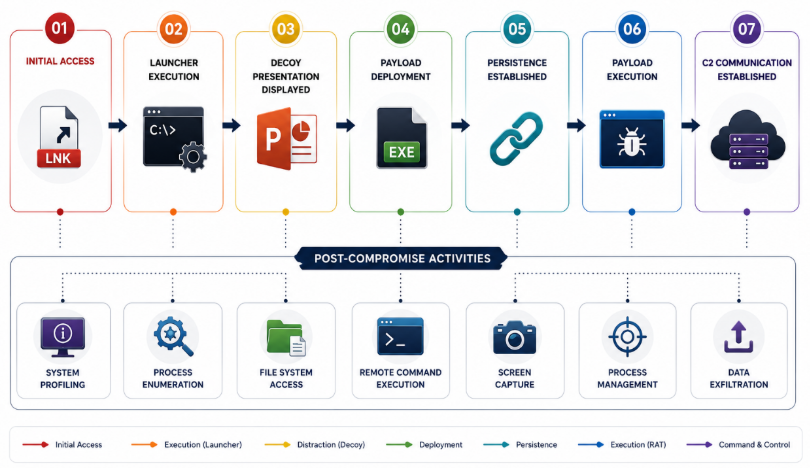
The analyzed malware employs a multi-stage infection chain that combines social engineering, stealthy execution, and persistence mechanisms to deploy a .NET-based Remote Access Trojan (RAT). The attack begins with a malicious LNK file disguised as a legitimate Microsoft PowerPoint presentation related to a government briefing. Upon execution, the shortcut silently launches a batch script that simultaneously displays a benign decoy presentation while deploying the RAT payload in the background. The malware then removes the Mark-of-the-Web (MotW), establishes persistence through an NTFS hardlink and a Registry Run key, and executes the payload. Once active, the RAT collects host information, establishes communication with its command-and-control (C2) server using multiple hardcoded ports, and awaits further instructions to perform reconnaissance, file operations, screenshot capture, process management, and remote command execution. The infection chain observed during analysis is illustrated below.
Analysis – Static Analysis
Government-Themed Decoy Presentation Used for User Distraction
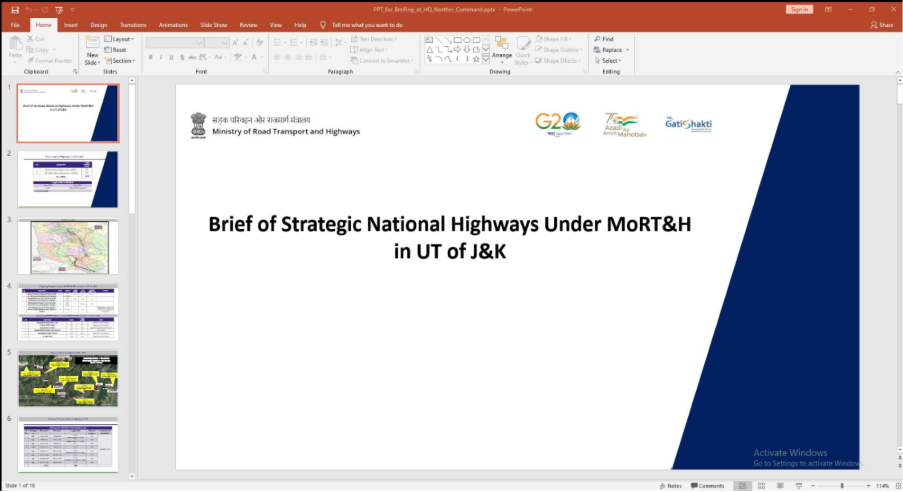
The recovered PowerPoint presentation functions as a decoy document that is displayed to the victim immediately after the malicious shortcut (.lnk) triggers the execution of the batch launcher. Static analysis of the launcher reveals that the script first copies the presentation to C:\ProgramData and opens it in Microsoft PowerPoint, while simultaneously deploying and executing the .NET RAT payload in the background. The presentation, titled “Brief of Strategic National Highways Under MoRT&H in UT of J&K,” incorporates official government branding, including the Ministry of Road Transport and Highways (MoRT&H) emblem and national initiative logos, creating the appearance of an authentic government briefing. This social engineering technique is intended to divert the victim’s attention by presenting legitimate-looking content while the malware establishes persistence, creates an NTFS hardlink, and initiates its command-and-control communication. Examination of the presentation package identified no embedded macros, malicious VBA code, ActiveX controls, or weaponized OLE objects, confirming that the PowerPoint file itself is benign and is used solely as a visual distraction to conceal the background installation of the RAT.

Phishing LNK File Disguised as a PowerPoint Presentation
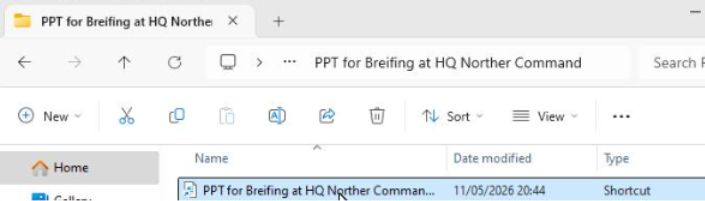
The recovered Windows shortcut (.lnk) is disguised as a legitimate Microsoft PowerPoint presentation titled “PPT for Breifing at HQ Norther Command.pptx.lnk.” The deceptive filename and PowerPoint icon are intended to convince victims that they are opening an official presentation. Static analysis confirmed that activating the shortcut executes a hidden command which launches the accompanying batch script (excel.bat), initiating the malware infection chain while presenting the decoy document to the victim.

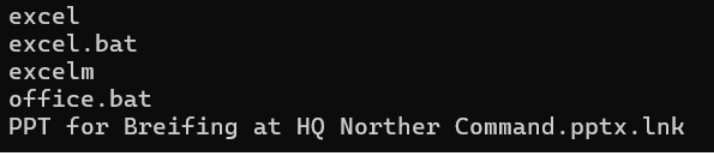
Recovered Malware Delivery Package Structure
The recovered delivery package contains all components required for the infection chain, including the malicious batch launchers (excel.bat and office.bat), the .NET RAT payload (excel), the decoy PowerPoint document (excelm), and the phishing LNK file. This bundled structure enables the attacker to deploy the payload, display the decoy presentation, and establish persistence using a single user interaction.
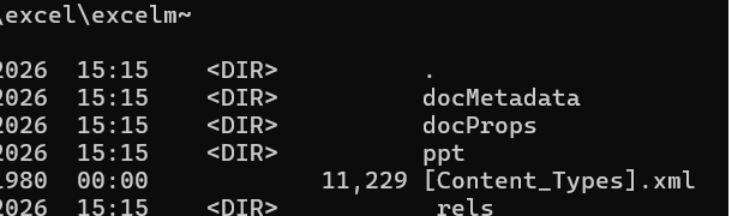
Internal Directory Structure of the Decoy PowerPoint Document
Extraction of the excelm file confirms that it is a standard Office Open XML (OOXML) PowerPoint archive containing expected directories such as docProps, ppt, _rels, and [Content_Types].xml. No embedded macros, executable content, or malicious objects were identified, confirming that the presentation functions solely as a legitimate-looking decoy used to distract the victim while the RAT is installed in the background.
Embedded Command-Line Execution within the Malicious LNK File
Hex-level analysis of the malicious Windows shortcut (.lnk) reveals the embedded command-line arguments used to initiate the infection chain. The shortcut invokes cmd.exe with the /c and /MIN switches to silently execute the excel\excel.bat launcher in a minimized command window. This approach conceals the execution of the batch script from the victim while triggering the deployment of the decoy presentation and the .NET RAT payload.

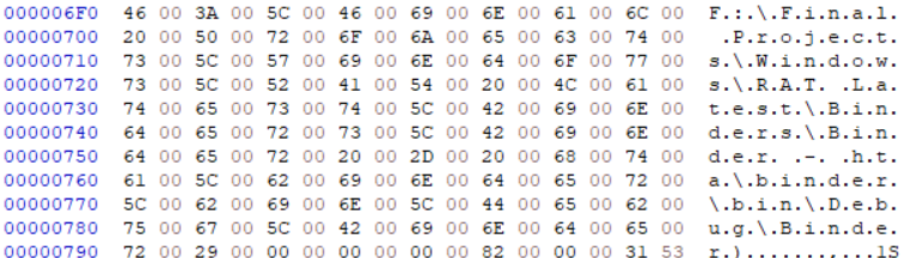
Developer Build Path Embedded in LNK Metadata
Metadata recovered from the LNK file exposes the original developer build path, referencing a project directory associated with a binder application used to package the malware and its decoy document. The recovered path indicates the sample was compiled within a Visual Studio debug environment, providing valuable forensic insight into the malware development workflow and build environment.
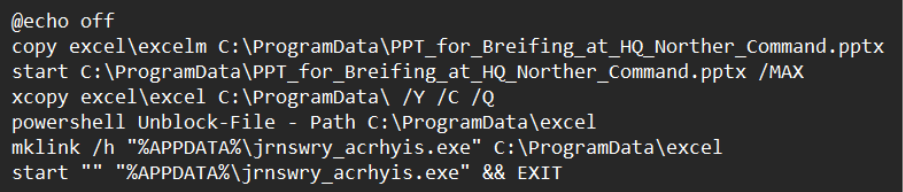
Primary Batch Script Responsible for RAT Deployment
The excel.bat launcher orchestrates the complete infection sequence by copying the decoy PowerPoint presentation to C:\ProgramData, displaying it to the victim, deploying the .NET RAT payload, removing the Mark-of-the-Web using Unblock-File, creating an NTFS hardlink within the user’s AppData directory, and finally executing the malware while terminating the batch process. This script acts as the primary execution mechanism for establishing persistence and initiating the malware.
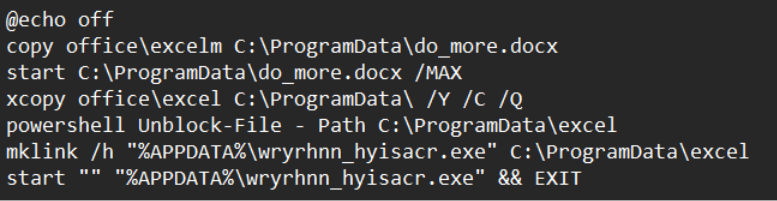
Alternate Batch Launcher Used for Campaign Variants
The office.bat script implements the same infection workflow as the primary launcher while using alternate filenames for the decoy document and hardlink executable. This variation demonstrates that the malware operator can easily customize delivery artifacts across campaigns without modifying the underlying RAT functionality, complicating static IOC-based detection.
Hardcoded Decoy C2 Address Initialization
The malware initializes a hardcoded IPv4 address (205.100.201.105) within a static string field after removing underscore-based obfuscation. Although this address is easily recoverable through conventional string analysis, subsequent examination of the malware’s initialization logic confirms that it serves as a decoy C2 endpoint intended to mislead analysts. The operational C2 infrastructure is instead retrieved from an encoded metadata blob during runtime.

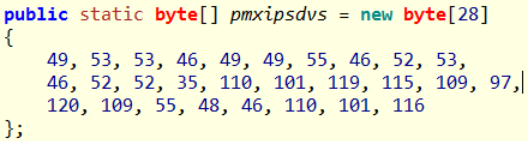
Encoded Byte Array Containing Operational C2 Information
The malware stores its operational command-and-control configuration within a statically initialized byte array rather than as plaintext strings. During execution, this byte array is decoded as a UTF-8 string to recover the active C2 infrastructure, preventing straightforward extraction through basic string analysis and requiring metadata-level inspection to reveal the embedded network indicators.
Static Command-and-Control Port Rotation Array
The malware defines a static integer array containing five TCP ports used for command-and-control communication. During runtime, the connection routine iterates through these ports while attempting to establish communication with the active C2 infrastructure, improving connection resilience and reducing dependence on a single network endpoint.

Recovered Operational C2 Infrastructure
Decoding the embedded metadata blob reveals the malware’s operational command-and-control configuration in the format

Runtime Parsing of Encoded C2 Configuration
The aepowrsIu() routine converts the encoded byte array into a UTF-8 string and separates the contained values using the # delimiter. This parsing mechanism reconstructs the operational C2 IP address and domain during execution, enabling the malware to dynamically retrieve its communication endpoints without exposing them as readily searchable plaintext strings within the executable.

Output : [“155.117.45.44”, “newsmaxm70.net”]
Registry Run Key Deobfuscation Routine
The malware reconstructs the persistence registry path by removing underscore-based obfuscation from a hardcoded string before opening the HKCU\SOFTWARE\Microsoft\Windows\CurrentVersion\Run registry key with write permissions. This technique conceals critical persistence artifacts from basic string analysis while allowing the malware to create or modify startup entries during execution.

Recovered Registry Persistence Path
After runtime deobfuscation, the malware resolves the standard Windows startup registry location used to achieve persistence. This registry path enables the malware to automatically execute whenever the current user logs into the system.

TCP Client Initialization for C2 Communication
The malware creates a TcpClient object and attempts to establish a network connection using the configured command-and-control endpoint and its associated port. This routine represents the initial stage of outbound communication between the infected host and the attacker-controlled infrastructure.

Network Data Reception Routine
The malware allocates a fixed byte buffer, reads incoming data from the active network stream, and converts the received bytes into an integer using BitConverter. This routine enables the malware to process length-prefixed network messages received from the C2 server.

Serialization of Outbound Network Data
Before transmission, the malware writes collected data into a MemoryStream using a StreamWriter. This serialization process converts textual information into a byte stream suitable for network transmission through the established TCP session.

Finalization of Serialized Data Buffer
The malware flushes both the StreamWriter and the underlying MemoryStream to ensure all buffered data is committed before transmission. This guarantees that complete network messages are available for delivery to the C2 server.

Host System Information Collection Routine
The malware gathers host-specific information, including the computer name, current username, and additional system identifiers, before formatting the collected values into a structured string. This information is later transmitted to the C2 server to profile the compromised host.

Transmission of Host Profiling Data
After collecting system information, the malware serializes the data and forwards it to the C2 server using its custom transmission routine. A randomly generated suffix is appended to the message, forming part of the malware’s proprietary communication protocol.

Primary Screen Capture Routine
The malware creates a bitmap matching the dimensions of the primary display to capture the victim’s screen. This image serves as the foundation for subsequent screenshot collection and remote surveillance activities.

Desktop Image Acquisition
Using the Graphics.CopyFromScreen() API, the malware copies the visible desktop into memory, enabling the attacker to obtain screenshots of the victim’s active session without requiring user interaction.

Dynamic Screenshot Scaling Routine
Following screen capture, the malware dynamically calculates new image dimensions and resizes the screenshot before transmission. This reduces bandwidth usage while allowing the attacker to adjust image quality according to operational requirements.

Enumeration of Running Processes
The malware retrieves the complete list of active processes using the .NET Process.GetProcesses() API. This enables the attacker to identify running applications and supports process management during post-compromise operations.

Collection of Process Identifiers and Names
Each enumerated process is formatted by combining its process identifier (PID) and executable name into a structured output string. The resulting dataset is subsequently prepared for transmission to the remote operator.

Transmission of Process Enumeration Results
The formatted process inventory is serialized and transmitted to the C2 server through the malware’s custom communication routine, allowing the remote operator to inspect processes running on the compromised system.

Initialization of Protected Directory Exclusion List
The malware initializes an internal list of Windows system directories that are excluded during filesystem traversal. By avoiding critical operating system locations, it reduces unnecessary processing and focuses file enumeration on user-accessible data.

Targeted File Extension Filtering Logic
Before processing files, the malware verifies each file extension against an internal target list. Matching files are prepared for subsequent collection or exfiltration, demonstrating selective targeting of specific file types during filesystem traversal.

Directory Accessibility Verification Routine
The malware validates directory accessibility by enumerating subdirectories before initiating recursive traversal. This prevents processing failures caused by inaccessible or protected filesystem locations.


Registry Run Key Validation and Persistence
Prior to creating persistence, the malware checks whether its startup registry value already exists. If the value is absent or differs from the expected payload path, it creates or updates the registry entry, ensuring automatic execution whenever the current user logs on.

Registry Run Key Creation for Persistent Execution
The malware verifies whether its persistence entry already exists within the HKCU\SOFTWARE\Microsoft\Windows\CurrentVersion\Run registry key. If the registry value is missing or differs from the expected executable path, it creates or updates the value using RegistryKey.SetValue(), ensuring that the malware is automatically executed whenever the current user logs on to the system.

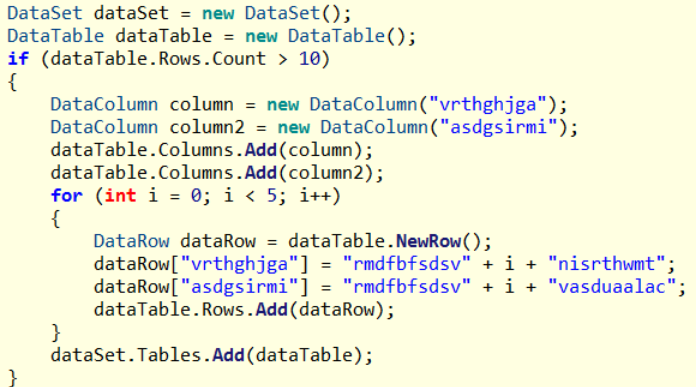
Dead-Code Obfuscation Using DataSet and DataTable Objects
The malware contains an intentionally unreachable code block that constructs DataSet and DataTable objects populated with randomly generated column names and values. Because the conditional statement (dataTable.Rows.Count > 10) is never satisfied for a newly created table, this logic is never executed during runtime. Instead, it serves as dead-code obfuscation designed to increase analysis complexity, mislead reverse engineers, and create the appearance of sophisticated data processing without contributing to the malware’s operational behavior.
Current User Identification
The malware retrieves the username of the currently logged-in user through the Environment.UserName property. This information is incorporated into the host profiling data transmitted to the command-and-control server, enabling the attacker to identify the compromised user account.

Collection of Hostname and System Identifier
The malware collects additional host profiling information by retrieving the system’s computer name and generating an internal host identifier through simple string deobfuscation. These values are combined with other system attributes to uniquely identify the compromised machine during communication with the command-and-control infrastructure.

Remote Command Capabilities
The analyzed .NET RAT implements a comprehensive command-and-control (C2) framework that enables the remote operator to execute a wide range of post-compromise actions. Following successful communication with the C2 server, the malware decodes incoming commands using its proprietary marker-based encoding mechanism before dispatching them through an internal command handler. The recovered command set provides capabilities for system reconnaissance, file system manipulation, process management, screen capture, remote command execution, and data exfiltration, allowing the threat actor to maintain persistent control over compromised systems. Static analysis confirmed 23 operational commands, each mapped to dedicated handler routines responsible for executing specific attacker-controlled actions.
| Command | Capability | Description |
|---|---|---|
| scursz | Screen Capture | Captures the victim’s desktop and transmits screenshots to the C2 server. |
| cucrsn | Remote Command Shell | Executes attacker-supplied shell commands on the compromised host. |
| puocl | Process Management | Terminates running processes specified by the operator. |
| thuumb | File Upload | Uploads local files from the victim system to the C2 server. |
| putsrt | File Write | Creates or writes files on the compromised host. |
| cnuls | Connection Test | Verifies connectivity between the victim and the C2 server. |
| geutavs | File Download | Retrieves files from the compromised system. |
| diurs | Directory Enumeration | Enumerates directories within a specified path. |
| fiu_lsz | File Enumeration | Lists files together with their sizes. |
| liustf | Drive Enumeration | Enumerates available logical drives. |
| deult | File Deletion | Deletes files from the compromised host |
| enudpo | Process Termination | Stops selected running processes. |
| afuile | Execute File | Executes attacker-supplied files or payloads. |
| stuops | Service Control | Stops Windows services. |
| scuren | Screen Monitoring | Performs continuous screen monitoring operations. |
| fiule | File Execution | Executes an existing file on the victim system. |
| inufo | System Information | Collects host information including OS and user details. |
| udult | File Update | Modifies or replaces existing files. |
| fludr | Folder Enumeration | Enumerates folders within target directories. |
| ruunf | Execute Program | Launches executable files on the compromised system. |
| douwr | Download Payload | Downloads files from remote locations. |
| douwf | Alternate Download | Secondary download routine supporting payload retrieval. |
| Additional Internal Commands | Internal Operations | Supplementary routines supporting RAT communication and task execution. |
Analysis – Dynamic Analysis
Observed Command-and-Control Connection Attempts
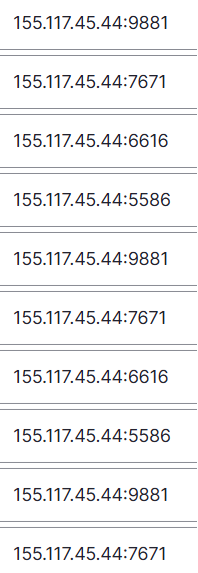
Network telemetry captured during dynamic analysis shows the malware repeatedly attempting to establish outbound TCP sessions with the identified command-and-control server using multiple predefined ports. Rather than relying on a single communication endpoint, the malware cycles through a hardcoded list of ports until a successful connection is established. This multi-port communication strategy enhances operational resilience by allowing the malware to maintain connectivity in environments where individual ports may be filtered, blocked, or unavailable.
Observed Malware Execution Workflow
Runtime monitoring confirmed that the infection chain is initiated through the malicious LNK file, which spawns cmd.exe to execute the embedded batch launcher. The launcher subsequently invokes PowerShell to remove the Mark-of-the-Web (MotW), copies the payload and decoy document into C:\ProgramData, creates an NTFS hardlink for the RAT executable within the user’s %APPDATA% directory, and finally executes the payload. The observed process hierarchy demonstrates a coordinated multi-stage execution sequence designed to establish persistence while minimizing user awareness by displaying a legitimate-looking PowerPoint presentation.

Dynamic Behaviour
Execution of the Decoy Presentation During Initial Infection
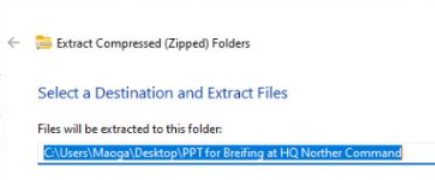
Dynamic analysis confirmed that following extraction of the compressed archive, the victim is presented with a folder containing a single shortcut (.lnk) masquerading as a legitimate Microsoft PowerPoint presentation. Upon execution, the shortcut silently invokes the embedded batch launcher, which deploys the .NET RAT payload, establishes persistence, and simultaneously opens a decoy PowerPoint presentation titled “Brief of Strategic National Highways Under MoRT&H in UT of J&K.” The presentation displays authentic government-themed content to divert the victim’s attention while the malware completes its installation and initializes communication with the command-and-control (C2) server. No malicious functionality was observed within the PowerPoint document itself, confirming that it serves exclusively as a social engineering lure during the infection process.
Analysis – Infrastructure
External Infrastructure Identification
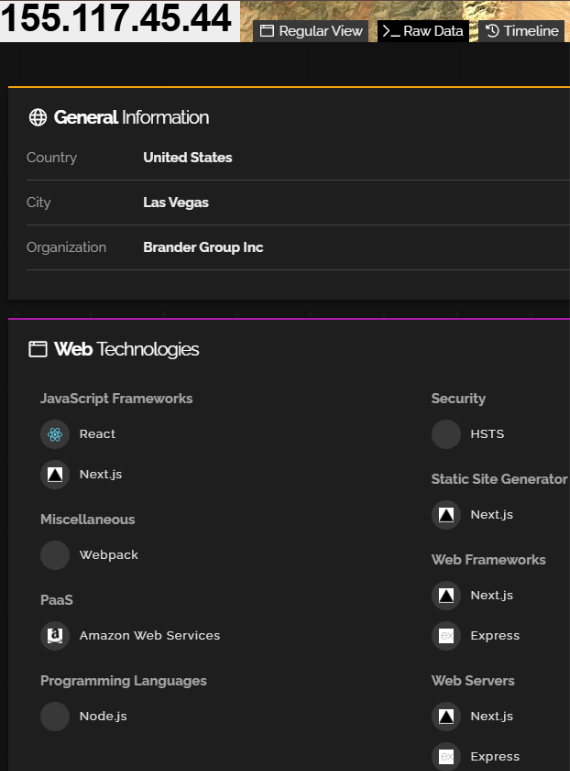
Passive infrastructure reconnaissance identified the malware’s command-and-control (C2) server at 155.117.45.44, hosted within the United States. Technology fingerprinting revealed multiple web technologies, including Node.js, Express, and Next.js, indicating that the server hosts a modern web application in addition to supporting the malware’s communication infrastructure. The coexistence of these services suggests that the threat actor maintains a centralized server capable of supporting both administrative functions and malware operations.
Exposed Web-Based Administration Interface
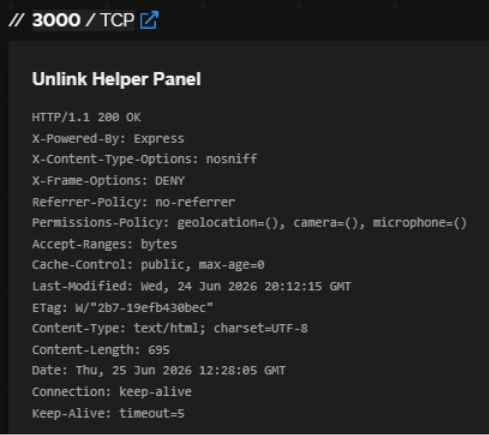
Analysis of TCP port 3000 identified an HTTP service presenting an “Unlink Helper Panel” powered by the Express framework. The response headers indicate a dedicated web application configured with multiple HTTP security headers, including X-Frame-Options, X-Content-Type-Options, and Referrer-Policy. The presence of this panel suggests that the infrastructure supports browser-based administrative access, potentially enabling operators to manage campaign resources or monitor infected hosts separately from the malware’s proprietary C2 communication channel.
Exposed MinIO Object Storage Instance
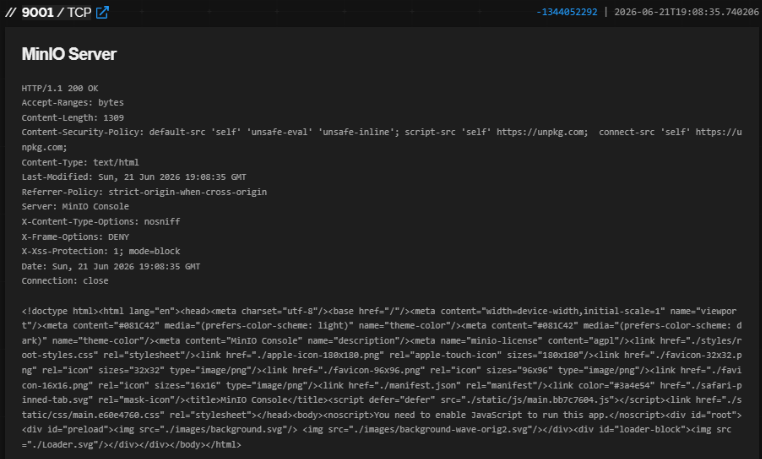
Further analysis identified an externally accessible MinIO Server listening on TCP port 9001. MinIO is an S3-compatible object storage platform commonly used for centralized file management. The exposed management console indicates that the threat infrastructure includes dedicated storage capabilities, which could facilitate the hosting, staging, or retrieval of operational resources such as payloads, collected data, or campaign artifacts. While the exact operational role of this service could not be confirmed through static analysis alone, its presence demonstrates a more structured and feature-rich backend infrastructure than a standalone malware C2 server.
Threat Assessment
The observed tradecraft demonstrates characteristics commonly associated with APT36 (Transparent Tribe), a South Asia-focused threat actor known for conducting espionage operations against government, defense, diplomatic, and critical infrastructure organizations. The campaign’s use of government-themed decoy documents, malicious LNK files for initial access, multi-stage execution through batch scripts, and deployment of a .NET-based Remote Access Trojan aligns with tactics frequently reported in operations attributed to APT36. The malware’s persistence mechanisms, metadata-obfuscated command-and-control configuration, multi-port communication strategy, and emphasis on remote surveillance further indicate an objective centered on long-term access and intelligence collection rather than disruptive activity. While these overlaps are notable, attribution should be considered an analytical assessment rather than definitive confirmation, as conclusive attribution requires additional evidence such as infrastructure correlation, malware lineage analysis, operational telemetry, or campaign linkage. Based on the available technical indicators and observed tradecraft, the activity is assessed with moderate confidence to be consistent with operations historically associated with APT36.
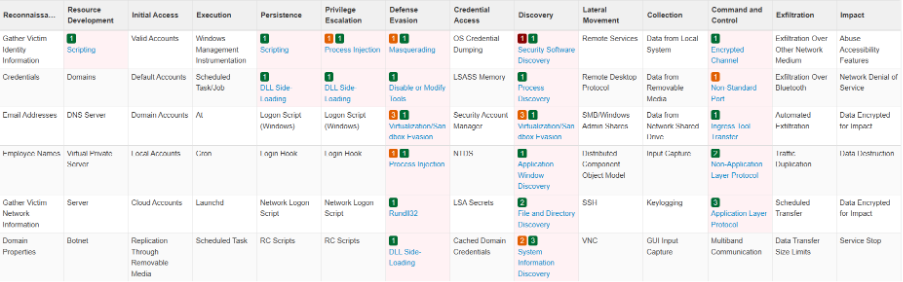
MITRE ATT&CK MAPPING
Conclusion
Operation Phantom Binder is a reminder that an attack doesn’t need to be technically loud to be dangerous. Its strength lies in the quiet choreography a trusted-looking briefing on screen, a RAT installing out of sight, persistence planted in two places, and a real command server hidden behind a decoy. Every layer, from the encoded C2 configuration and five-port rotation to the underscore-obfuscated strings and unreachable dead code, is designed to buy the operator time and make the malware harder to find and understand. Backed by its 23-command toolkit and a structured backend complete with an administration panel and object storage, this is plainly the work of an actor built for persistence and patient intelligence gathering, not for causing visible damage.
Taken together, the government-themed lures, LNK-based entry, multi-stage batch execution, and bespoke .NET RAT point with moderate confidence toward APT36 (Transparent Tribe) though this remains an analytical judgment that would need infrastructure correlation, malware-lineage analysis, or broader campaign linkage to confirm. For defenders, the most useful takeaways are behavioral: watch for LNK files spawning minimized batch scripts, Mark-of-the-Web tampering, new Registry Run entries, and traffic to the identified C2 infrastructure. Paired with the MITRE ATT&CK mapping in this report, those indicators give security teams a concrete starting point for hunting this campaign and the broader tradecraft it represents.
Indicators of Compromise (IOCs)
| S No | IOCs | Type |
|---|---|---|
| 1 | a9600cfc69d4960d2c7be6fe24203f30a3d945ba638b402efe843e56e7a8805c | SHA-256 |
| 2 | 1d68ae4327efaae00af169c6b4baf46bc262fe79cc99e290f97dfa812a6dfad2 | SHA-256 |
| 3 | abfac8026d1974220871568caf9344cbffed19a184ff098c0912ffbb4f1e42d5 | SHA-256 |
| 4 | 3063285af5c7586ad04178c52b55da2bc1970cb7ae4fadba2195ad4a3fb8ac50 | SHA-256 |
| 5 | befcffc4494e71f0efa03db4b3cfb71f72eab2ee9b406e867569062f238d4c3b | SHA-256 |
| 6 | 155.117.45.44 | IP |
